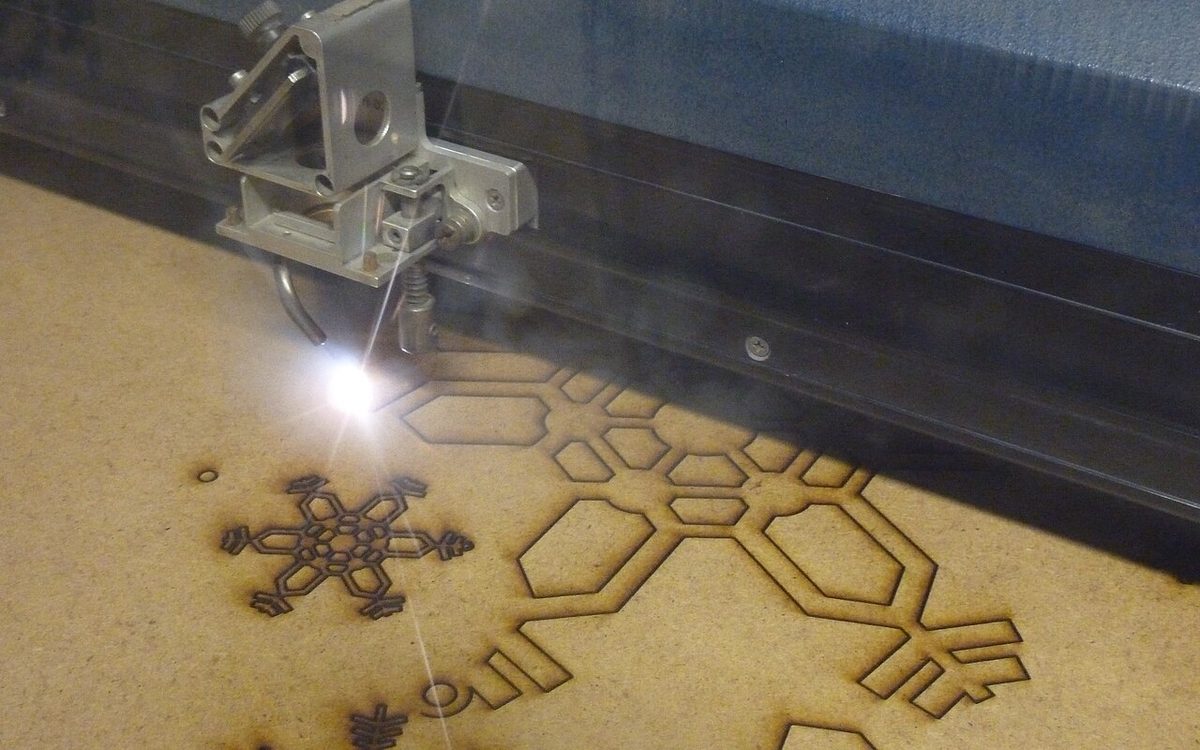
Bambu Lab's R1 is a 55 W CO₂ laser cutter for $2,499, the company's first machine that is not a 3D printer. It started shipping in October and was on show at Formnext in Frankfurt this week, so a lot of small print shops are asking the same question we asked: does a laser belong next to the printers? This guide covers what the R1 actually does, where a laser beats a printer, what it costs to run safely, and how to decide.
▶ Watch the video version (about 4 minutes):
What Bambu Lab launched
Bambu Lab announced the R1 on September 22, 2026 with pre-orders the same day and shipping from October. The price is $2,499 in the US (before tax, shipping included) and €2,499 in the EU (tax included, shipping excluded). The headline numbers from Bambu Lab's launch post and store spec sheet:
- Laser: 55 W CO₂, about 10,600 nm wavelength, liquid-cooled glass tube.
- Work area: 600 × 300 mm. With the optional Conveyor, material up to 3,000 mm long.
- Cutting depth: up to 15 mm black walnut plywood with the included short-focus lens, 18 mm with the optional medium- or long-focus lens, and 20 mm acrylic.
- Speed: up to 1,000 mm/s, 20,000 mm/s² acceleration.
- Positioning: "TriSense" (a bird's-eye camera, a toolhead camera, a pinpoint laser, a distance-measuring laser and XY encoders), with positioning accuracy under 0.2 mm.
- Materials: cuts and engraves wood, acrylic (including clear acrylic), leather, fabric, paper, EVA foam and shell; engraves glass, ceramic, stone and coated metal. It cannot mark bare metal.
- Footprint: 940 × 560 × 200 mm and 33.5 kg, according to Tom's Hardware's review.
Two features target the usual pain of CO₂ lasers. Auto Laser Alignment uses a sensor plate on the toolhead and motorised mirror mounts to align the beam path in about a minute, a job that is normally done by hand with thermal paper and test pulses. Speed-synced laser power changes output with head speed so corners don't burn darker than straight lines.
Everything outside the short-focus lens is an add-on: Riser Base, Conveyor, Rotary, medium and long lenses, Vision Encoder, the E1 Pro air purifier and the Auto Fire Extinguishing system are all sold separately.
Why a CO₂ laser and not the diode you may already have
Bambu's H2D printers offered an optional 10 W or 40 W diode laser module (R1 FAQ). The R1 is a different class of tool, and the difference is physics more than power:
- Clear acrylic and glass. A blue diode beam passes straight through transparent acrylic and glass. The CO₂ wavelength is absorbed, so the R1 cuts clear acrylic and engraves glass. For a print shop, that means clear covers, display stands and signage.
- Thicker cuts with less char. Bambu quotes 18 mm walnut plywood; Tom's Hardware found cuts on 3 mm basswood "show much less charring than you would see on a diode laser."
- Throughput. In the same review, a 3 mm basswood test file (lines, engraving and cuts) finished in under two minutes, and sticker sheets cut in seconds.
The trade-off: a CO₂ machine is heavier, needs coolant, and is loud. Tom's Hardware called it "the loudest laser I've reviewed," with fans that run constantly.
| 3D printer (FDM) | CO₂ laser (R1) | |
|---|---|---|
| Best geometry | 3D shapes, enclosures, clips, hinges | Flat parts, panels, stencils, outlines |
| Typical job time | Hours | Seconds to minutes |
| Clear parts | Hard (translucent at best) | Clear acrylic with polished edges |
| Engraving | Not practical | Wood, leather, glass, coated metal |
| Fumes | Low with PLA/PETG | Smoke on every job; exhaust needed |
| Noise | Moderate | High (fans always on) |
Where a laser actually helps a print shop
The best reason to add a laser is not "more services"; it is combining the two processes so each does what it is good at.
- Hybrid enclosures. Print the frame, corners and mounting bosses; laser-cut the large flat faces from acrylic or plywood. A 300 × 200 mm flat panel that takes hours to print cuts in a minute and stays flat.
- Clear windows and covers. Display boxes, model covers and sensor housings with a clear lid look much better in laser-cut acrylic than in printed PETG.
- Architecture and product models. Facades, floor plates and site bases cut fast from card or thin plywood, with printed details glued on. Students already ask us for this mix (see our architecture models guide).
- Personalisation. Engraving names or logos on wood, leather, slate or coated tumblers. The R1's curved-surface mode maps the surface height before engraving; Tom's Hardware engraved a coated flask with the aluminium business-card preset.
- Packaging and finishing. Cut foam-free inserts from card, labels from kraft paper, and jigs that hold printed parts for painting.
If most of your orders are figurines, functional brackets or cosplay armour, a laser adds little. If customers often ask "can you add a clear lid / a sign / a nameplate?", it may pay off fast.
What it really costs to run
The $2,499 base price is not the whole bill. Plan for these before you order:
- Exhaust. Bambu's first-use guide says the smoke hose must go outdoors or into a laser-specific purifier such as the E1 Pro. Wood and acrylic smoke is not something to vent into a shared office.
- Thicker-cut lens. The included short-focus lens tops out at 15 mm walnut. Tom's Hardware needed the long-focus lens to get through 19.5 mm pine, and swapping lenses means removing six small screws and re-running a vision calibration of about five minutes.
- Coolant. The tube is cooled with a mix of antifreeze and distilled water (about 1,500 ml to prepare). Read the fill order carefully; the reviewer spilled it on the first try.
- Fire safety. The R1 has flame sensors, a lid interlock and an emergency stop. The automatic extinguisher is optional, so budget at least a CO₂ extinguisher next to the machine, and never leave a cut unattended on card or thin wood.
- Power and space. TechRadar lists a 780 W maximum input (review), and you need a sturdy table plus room to lift a 33.5 kg machine with two people.
- Material settings. Both reviews say the preset library is thin today. Expect test cuts and a notebook of your own settings for anything beyond 3 mm plywood and acrylic.
Safety: the Class 1 caveat and the material list
In its standard enclosed setup the R1 is a Class 1 laser under IEC 60825-1, so no goggles or dedicated room are required. Bambu Lab is explicit about the catch: once you fit the Riser Base or Conveyor, the enclosure is open and the R1 becomes a Class 4 device that needs CO₂-rated goggles and trained operators. Plan the furniture-scale work as a separate, supervised setup.
The bigger risk in a print shop is what you put on the bed. Leftover printer plastics and customer materials are the trap:
- Never cut PVC, vinyl or artificial leather. MIT's laser cutter safety guidance prohibits PVC and other chlorinated plastics because they release hydrogen chloride and corrode the optics.
- Don't cut ABS, polystyrene or foam. The University of Victoria's material list flags ABS and styrenes for toxic gases (including hydrogen cyanide from ABS) and high fire risk.
- Polycarbonate cuts badly. It absorbs the CO₂ wavelength, discolours and can catch fire.
- PETG is a judgement call. Tom's Hardware cut 1-2 mm PETG cleanly with custom settings, but Carnegie Mellon's IDeATe lab bans PETG on its lasers. If you allow it, keep it thin and ventilated.
- Unknown material = no cut. Ask for the supplier's SDS. Acrylic and polycarbonate look alike; so do PU leather and real leather.
Print the forbidden list and tape it to the lid. It is cheaper than a new lens.
A decision checklist
Answer these before buying:
- Do at least 20-30% of your quotes include a flat part, sign, clear cover or engraving? If not, outsource the occasional laser job.
- Can you exhaust outdoors? If the only option is a purifier in a closed room, include the E1 Pro (or an equivalent laser filter) and its replacement filters in the price.
- Is there a separate room or corner for the noise? The fans run constantly.
- Which lens do you need? Most decor and enclosure work is 3-6 mm stock, where the short-focus lens is fine. Furniture or thick signage needs the medium or long lens.
- Who owns the materials list? One person should approve every new sheet type.
- Would a diode laser do? If you only engrave wood and leather and never need clear acrylic or glass, Tom's Hardware points to the 20 W Creality Falcon A1 Pro at $1,099 as a cheaper option.
Our take
At Lightning Lab in Da Nang, most of our requests are printed parts, but a steady share ask for a clear acrylic cover, a laser-cut base for an architecture model, or a name engraved on a gift. Today we either print flat panels slowly or send them to a laser shop. A CO₂ laser that self-aligns and shares an account and workflow with Bambu printers removes most of the setup pain that kept small labs away from CO₂ machines.
We would still not buy one blind. Our climate adds two concerns: humidity is hard on wood stock, and a hot room makes coolant and exhaust planning matter more. For a shop like ours, the sensible path is to log how many laser-type requests come in for a month, price the full setup (machine, purifier, long lens, extinguisher), and only then decide. If the numbers show a few jobs a week, the R1 looks like one of the easiest CO₂ lasers to bring into a print shop right now.
Sources
- Big Job. Light Work. Bambu Lab Launches R1 (Bambu Lab blog)
- Bambu Lab R1 product and specifications (Bambu Lab store)
- Bambu Lab R1 FAQ
- First Use Bambu Lab R1 (Bambu Lab Wiki)
- Bambu Lab R1 Review (Tom's Hardware)
- Bambu Lab R1 laser cutter and engraver review (TechRadar)
- Bambu Lab R1 laser cutter gets full release (DEVELOP3D)
- Bambu Lab at Formnext 2026 (Bambu Lab blog)
- Laser Cutter Safety Guidance (MIT EHS, PDF)
- Laser Cutter Safety: Materials (University of Victoria, PDF)
- Laser cutter material selection (Carnegie Mellon IDeATe)
Need a part that mixes printed and flat pieces, or not sure which process fits your project? Email lab@lightning-studio.org or visit https://lightning-studio.org/lab/ and we'll suggest the cheapest way to make it.
Cover photo: Laser cutting snowflakes by Andy Dingley, CC BY-SA 3.0, via Wikimedia Commons (cropped).
Related posts
Flexible Filaments in 2026: TPU 75A, High-Rebound TPE and G-Flex PETG
Bambu's 2.85 mm TPU 75A, new high-rebound TPE grades and Polymaker's G-Flex PETG take three routes to soft or tough parts. What each needs and when to use it.
Pellet 3D Printing in 2026: When FGF Beats Filament
Prusa now sells pre-dried pellets in 4-14 kg packs and FGF printers start at $15,000. What pellet printing saves, what it costs you, and who should try it.
Prusa's Firmware Security Bulletin: Lock Down Your Networked Printer
Prusa disclosed 14 Buddy firmware flaws, with exploit code expected in December. Which printers are affected, how risky it is, and a checklist to update and secure any networked printer.