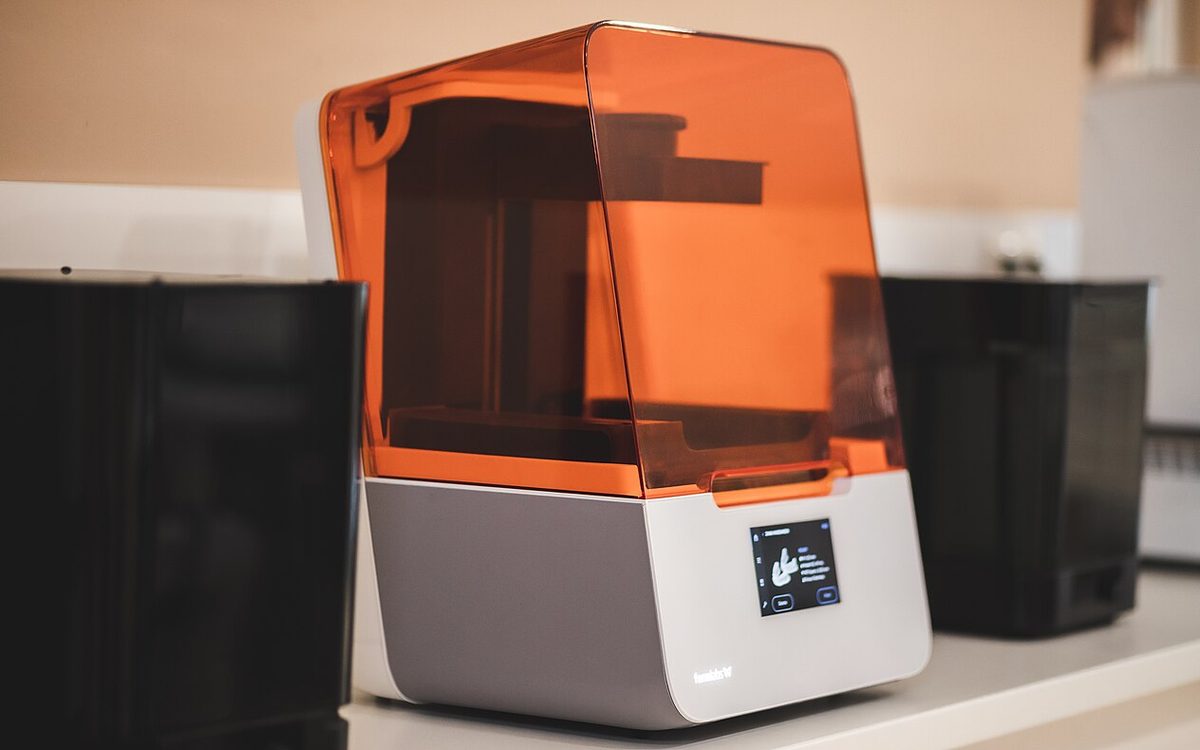
Formlabs has spent more than a decade selling resin printers to engineers, dental labs and product teams at professional prices. On October 14, 2026 it announced the Form Studio 1, a desktop resin printer that starts at $699, ships from November 16 and goes straight at the price band that Elegoo, Anycubic and Creality have owned for years. This guide explains what you actually get for that money, what the low price leaves out, and how to decide between the Form Studio 1 and a cheaper consumer MSLA machine.
▶ Watch the video version (about 4 minutes):
What Formlabs announced
The Form Studio 1 was introduced at TCT Shenzhen, in the middle of the market it wants to compete in, as 3DPrint.com noted. The launch came with a full ecosystem rather than a single box:
- Form Studio 1 printer, from $699 (printer, one resin tank and a standard build platform).
- Six Alpha Resins (Grey, White, Black, Clear, Model and Fast), from $29 per liter.
- Form Studio Wash+Cure, a compact unit that washes and cures in one footprint.
- VOC Extractor, an add-on that lowers emissions during printing.
- Form Mobile app, with a live camera feed and notifications.
3DPrint.com lists three bundles: $699 for the printer, $948 for a package with the flexible build platform plus washing and curing equipment, and $1,647 for a professional package with separate wash and cure units. Orders opened worldwide on launch day, and a Founder's Edition in limited colours runs until November 30, 2026.
The hardware in plain numbers
Despite the "professional" label, this is an MSLA printer: an LCD masks UV light to cure each layer, the same basic principle as a $250 hobby machine. The differences are in the light source, the tank and the software around it. The figures below come from the Formlabs press release, the Formlabs launch blog and the TechRadar review.
| Spec | Form Studio 1 |
|---|---|
| Process | MSLA with Low Force Display (LFD) |
| Build volume | 200 × 125 × 235 mm |
| XY pixel size | 35 µm |
| Layer height | 30-250 µm, depending on resin |
| Light source | 28 LEDs + lens array, 6 mW/cm² |
| Max speed | 130 mm/h (Alpha Fast), ~40 mm/h average |
| Resin handling | Cartridge with automatic dispensing and heating |
| Tank life | 75,000+ layers (Formlabs estimate) |
| Software | PreForm only |
Two details matter more than the pixel count. First, the backlight: Formlabs says most low-cost printers use a single COB light with a Fresnel lens, which hits pixels at an angle, while the Form Studio 1 uses 28 LEDs and a plano-convex lens array for collimated, even light. Second, the tank: a flexible film and a textured "Release Texture V2" surface reduce peel forces, so parts need lighter supports. Many consumer printers now quote 16K screens with smaller pixels than 35 µm, and 3DPrint.com points out that a smaller pixel does not automatically mean a better print. Light uniformity and peel forces often decide surface quality more than resolution on paper.
Where the extra money goes: workflow, not resolution
The real pitch is less time spent fighting the printer. MatterHackers compared the old resin routine with the Form Studio 1 workflow, and the list is familiar to anyone who has run a cheap resin machine:
- No exposure calibration for supported resins. Each of the nine materials supported at launch ships with validated settings; in PreForm you pick the material and a layer height.
- No plate sanding or regular leveling. You level the printer on its feet during setup; shims are in the box if the platform ever needs adjustment.
- No pouring. The cartridge dispenses and heats resin and tops up the tank during the print. The printer checks that cartridge and tank materials match before it starts.
- Swapping materials means swapping tanks. Each resin lives in its own tank with a reusable lid, so you do not drain and clean a vat for every colour change.
The TechRadar reviewer spent a month with the printer and described setup taking about five minutes, with no failed prints after switching from white to clear resin. Formlabs claims a 98% print success rate, but read the footnote: that figure is based on the Form 4, which third-party testing measured at 98.7%, and Form Studio 1 reliability testing was still in progress at launch.
Open Material Mode: free, but with conditions
Older Formlabs printers needed a paid Open Material licence for third-party resins. The Form Studio 1 includes Open Material Mode at no cost, which is a real change. The conditions, from the Formlabs blog and Siraya Tech's setup guide:
- Use the Resin Tank Pro. The standard tank is tuned for Alpha Resins, True Cast and Flexible 80A V2. Formlabs warns other chemistries can degrade its film quickly and cause leaks. The Pro tank has a chemically resistant dual-layer film but prints slower.
- Pour by hand. Automatic dispensing is off in this mode.
- Set exposure as an energy dose (mJ/cm²), not seconds. Siraya Tech suggests changing the dose in steps of about 10%, one variable at a time.
- Stir before each print. There is no wiper, so pigmented and filled resins can settle.
- Stay at 405 nm and keep preheat constant while you tune; the printer heats resin up to 45 °C.
The other limit: the Form Studio 1 works only with PreForm. You cannot slice in Chitubox or Lychee, which matters if your team already has support presets there.
Safety: what the certification does and does not mean
The Form Studio 1 is the first resin printer to earn UL GREENGUARD Gold certification, but only when used with Alpha Resins and the VOC Extractor. In Formlabs' own chamber test, total VOCs after 240 minutes were 0.66 mg/m³ with the extractor, 1.70 mg/m³ without it, and 4.21 mg/m³ for an unnamed competitor printer. Alpha Resins are certified for long-term skin contact under ISO 10993, but only after correct washing and curing.
Liquid resin is still a chemical. MatterHackers points out that the Alpha Model Resin safety data sheet lists it as a skin irritant and sensitizer, so gloves stay mandatory. Parts still come out wet and need an IPA wash and UV cure, and resin-contaminated IPA must not go down the drain. Our resin safety guide covers that routine; none of it goes away with a better printer.
Form Studio 1 vs a $400-500 consumer resin printer
3DPrint.com checked US store prices at launch: the Elegoo Saturn 4 Ultra 16K on sale at $399 (regularly $649.99), the Creality HALOT-X1 from $469, and the Anycubic Photon Mono M7 Pro at $489 (regularly $669). These machines already offer automatic leveling, resin heating and, on some models, automatic refilling. So the decision is not "automation vs no automation" any more.
| Question | Form Studio 1 | Typical 16K consumer MSLA |
|---|---|---|
| Entry price | $699 | ~$400-500 (sale prices) |
| Build volume | 200 × 125 × 235 mm | Often larger |
| Resin cost | Alpha from $29/L | Third-party resin, often cheaper |
| Tuning new resins | Not needed (9 validated) | Exposure tests per bottle |
| Third-party resin | Yes, Pro tank + manual pour | Yes, native |
| Slicer | PreForm only | Chitubox, Lychee, brand slicers |
| Indoor emissions | Certified (with extractor) | Usually not certified |
Choose the Form Studio 1 if
- Your time is worth more than the price gap: a small design office, an architecture or product studio, a school lab where students cannot spend a week dialing in exposure.
- You print functional or skin-contact parts (wearables, grips, enclosures) and want documented material properties.
- The printer will sit in a shared room, not a garage.
Choose a consumer MSLA printer if
- You mainly print miniatures and figures in large batches and need a bigger plate for the money.
- You already like Chitubox or Lychee and have tuned profiles.
- You want to experiment with many cheap or specialty resins and do not mind pouring and calibration.
A buying checklist before you order
- Price the real kit. The $699 box has no wash or cure station. Budget for the $948 bundle or your own wash setup, gloves, IPA and a curing light.
- Count your tanks. One per resin you rotate, plus a Resin Tank Pro for third-party or Tough 1500 resin.
- Plan for consumables. Formlabs rates tanks at 75,000+ layers (about 200 prints 37 mm tall at 100 µm) and the light processing unit at 750K-1.5M layers. Ask your local reseller about prices and stock before you commit.
- Check delivery and service. Shipping starts November 16, 2026. Outside the US and EU, confirm who handles warranty and spare parts.
- Wait for long-term data. The launch reviews are positive, but the reliability figure is still borrowed from the Form 4.
Our take
At Lightning Lab in Da Nang we run FDM and resin side by side, and most of the time we lose on resin is not printing: it is calibration after a resin change, failed first layers, and cleaning the vat. A printer that removes those steps is worth more than a sharper screen, especially for clients who need clean prototypes, architecture details or skin-contact parts. For us the Form Studio 1 makes sense as a "quiet, predictable" second resin machine, while a larger consumer MSLA printer stays the better tool for big batches of miniatures. Our climate adds one more reason to like sealed cartridges and lidded tanks: open vats and bottles do not enjoy Da Nang humidity and heat. We will wait for units to reach Vietnam and for independent long-term reports before recommending it without conditions.
Sources
- Formlabs press release: Form Studio 1 introduced (Oct 14, 2026)
- Formlabs blog: Introducing Form Studio 1
- 3DPrint.com: Formlabs enters the $699 resin 3D printer market
- TechRadar: Formlabs Form Studio 1 review
- MatterHackers: Resin printing then vs now
- Siraya Tech: How to print third-party resin on Form Studio 1
Not sure whether a part should be printed in resin or FDM? Send your model to lab@lightning-studio.org or visit Lightning Lab and we will suggest the right process, material and finish.
Cover photo: 3D-Drucker in der Zahntechnik by Stutamad, CC BY-SA 4.0, via Wikimedia Commons (cropped).
Related posts
3D Printing Glossary: English and Vietnamese Terms Every Maker Should Know
About 50 key 3D printing terms in English and Vietnamese, grouped by process, machine parts, slicer settings, materials, defects and post-processing.
Lightweight Foaming PLA: How to Print It and When It Makes Sense
Prusa, Bambu Lab and colorFabb now all sell foaming PLA. How temperature and flow control weight, how to beat stringing, and what strength you give up.
3D Printing in Education: A Practical Guide for Teachers and Schools
What to print for teaching, STEM projects students can design themselves, classroom safety, budgeting and a simple lesson flow from sketch to printed part.