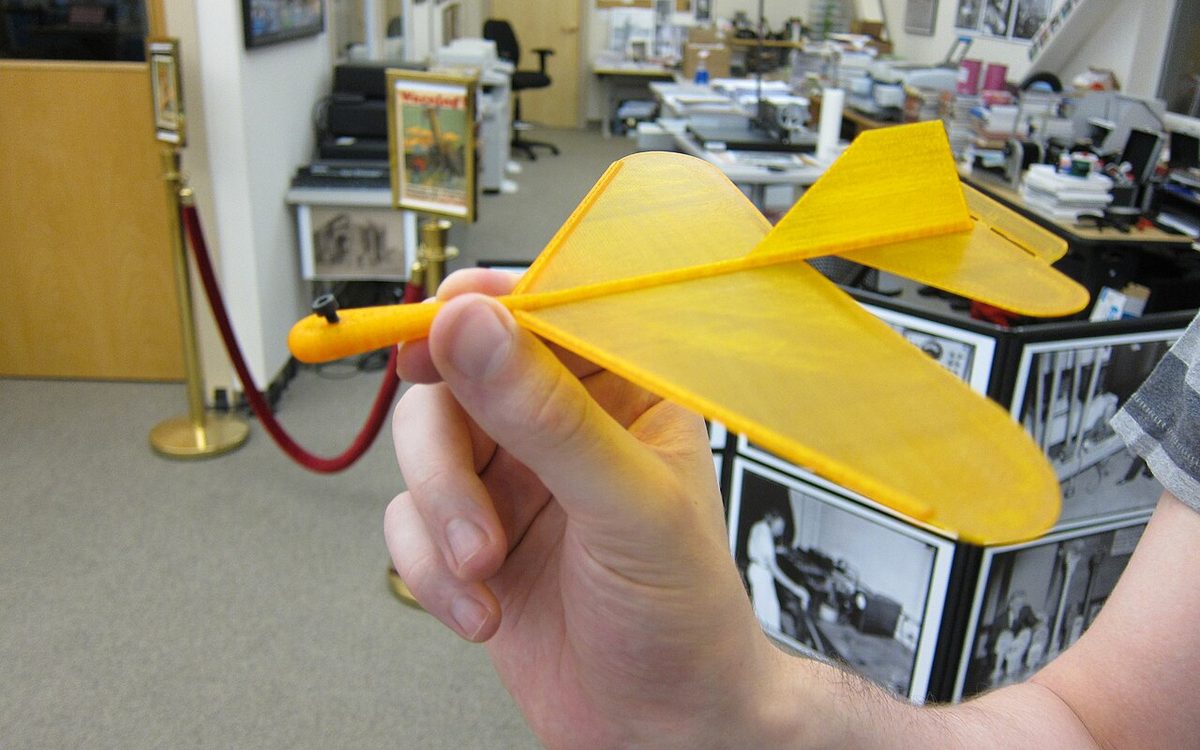
Prusa Research added a foaming filament to its Prusament line on September 17, 2026, and with it lightweight PLA moved from a niche RC-plane material to something most desktop printer owners can buy from their printer's own brand. Prusa, Bambu Lab and colorFabb now all sell an "active foaming" PLA with official slicer profiles. The material is useful, but it breaks several habits that work for normal PLA. This guide explains how foaming PLA behaves, how to dial it in, and where it makes sense.
What changed this autumn
Prusament PLA Lightweight launched in five colors at 56.99 USD / 59.90 EUR per kilogram. Prusa claims up to 65% lower part weight than regular PLA and says one spool can print two to three times more models, because the plastic expands as it leaves the nozzle. It ships with PrusaSlicer profiles for the CORE One+ family, MK4S, XL and XL+.
It joins two established products. colorFabb LW-PLA was the first filament of this type and is still the reference for RC aircraft. Bambu Lab PLA Aero has a ready-made profile in Bambu Studio and a detailed printing guide for RC models. With all three big ecosystems covered, the question is no longer "can my printer do it" but "should I, and how".
Active vs passive foaming: know what you bought
Not every "LW-PLA" works the same way. Bambu's wiki splits them into two groups:
- Active foaming filaments (colorFabb LW-PLA, eSun eLW-PLA, Bambu PLA Aero, and now Prusament PLA Lightweight) contain a blowing agent that reacts in the hot end. Bubbles form as the plastic melts, the extruded line swells, and the amount of swelling depends on temperature, speed and time in the nozzle.
- Passive foaming filaments, such as Polymaker PolyLite LW-PLA, are foamed at the factory. Polymaker lists a density of 0.9 g/cm³ and a normal 190-210 °C range, so you print it with roughly normal PLA settings and a flow close to 100%.
The trade-off is simple. Passive filament is easier to print but less light: regular PLA is about 1.24 g/cm³, so 0.9 g/cm³ is roughly a 27% saving. Active filament can go much lighter, but only if you change your settings. If you load an active foaming spool with a normal PLA profile, you will get a heavy, over-extruded, blobby part and conclude the material is bad.
Temperature is your density dial
With active foaming PLA, nozzle temperature controls how much the plastic expands. Bambu publishes test data for PLA Aero (0.4 mm nozzle, 80 mm/s, a small 80 x 10 x 4 mm specimen) that shows the effect clearly:
| Nozzle temp | Min. flow ratio | Volume expansion | Min. print density |
|---|---|---|---|
| 200 °C | 0.89 | 110% | 1.06 g/cm³ |
| 220 °C | 0.76 | 129% | 0.91 g/cm³ |
| 230 °C | 0.62 | 158% | 0.74 g/cm³ |
| 240 °C | 0.45 | 217% | 0.54 g/cm³ |
| 250 °C | 0.38 | 258% | 0.45 g/cm³ |
| 260 °C | 0.35 | 280% | 0.42 g/cm³ |
Two things stand out. First, below about 220 °C there is little foaming, so the material behaves almost like standard PLA. Second, the curve flattens at the top: Bambu's own table shows the effect peaking around 260 °C, with 270 °C giving no further gain.
Prusa reports the same pattern on its filament at lower numbers. Foaming starts to show at 215 °C and reaches its maximum at 235 °C. Going higher brings no meaningful extra weight saving, hurts the surface, and Prusa warns not to exceed 250 °C because the material may release harmful fumes. Each brand's blowing agent is different, so never copy temperatures between brands. Use the profile for the spool you actually have, then adjust.
Color changes with foaming too. More foaming gives a paler, matte finish; Prusa notes its Galaxy Black prints as a dark concrete grey. If color matters, print a test at your chosen temperature before committing to a large part.
Flow: deliberate under-extrusion
Because each line swells after it leaves the nozzle, you must feed less plastic. This is the part that confuses most people, since every other material treats a flow value far from 1.0 as an error.
Typical starting points from the manufacturers:
- Prusament PLA Lightweight: 230 °C, extrusion multiplier 0.45, bed 60 °C, retractions off.
- Bambu PLA Aero: flow ratio around 0.6 at 245 °C in the RC guide; the product page gives a working range of 0.5-0.8 and 220-260 °C.
- colorFabb LW-PLA: the colorFabb tutorial suggests reducing flow by 20-50% at high foaming temperatures, and its datasheet tests the foamed state at roughly 50% flow.
To fine-tune, Prusa recommends a simple wall test, which works on any printer:
- Model or download a 20 mm cube.
- Slice it with a 0.4 mm nozzle, one perimeter, 0% infill, no top layers.
- Print at the temperature you intend to use for the real part.
- Measure the wall with calipers. Prusa targets 0.45-0.5 mm.
- If the wall is thicker, lower the multiplier; if thinner, raise it. Repeat until it lands in range.
Do this again whenever you change temperature, nozzle size or print speed, because all three change how long the plastic sits in the hot zone and therefore how much it foams. On Bambu printers, also untick Flow Dynamics calibration before sending the job. Bambu says the automatic calibration does not read foaming PLA accurately and the calibration line itself tends to string and ooze.
Stringing, travel and speed
Foaming PLA keeps expanding in the nozzle while the head travels, so it oozes. colorFabb states plainly that this "is normal and can't be reduced completely". You can, however, design and slice around it:
- Avoid travel moves. Prusa suggests "Avoid crossing perimeters" with a maximum 40 mm detour in PrusaSlicer. Print one object at a time, or use sequential printing for small parts.
- Reduce or disable retraction. Prusa's profile turns retractions off; Bambu's guide says to reduce or disable retraction and disable Z-hop. Long retractions pull foamed, half-reacted plastic back into the melt zone and cause inconsistent lines.
- Slow down. The blowing agent needs time to react. Bambu's guide uses about 50 mm/s outer walls for RC parts, and colorFabb suggests 30-60 mm/s. Keep speeds constant and turn off "slow down for overhangs", so every part of the line gets the same heat history.
- Low fan. Bambu suggests 30% or less, colorFabb 0-50%. Strong cooling freezes the foam early and weakens layer bonds.
- Use vase mode where possible. Bambu notes that RC airframes are designed so each layer prints as one closed loop, ideally in spiral vase mode, which removes travel completely.
Whatever strings remain are thin and brittle. A hobby knife or a quick pass with a heat gun (from a distance) removes them.
Strength: what you give up
Foam is mostly air, so strength drops. colorFabb's published data for LW-PLA makes the scale clear:
| colorFabb LW-PLA | Unfoamed (210 °C, 100% flow) | Foamed (235 °C, 50% flow) |
|---|---|---|
| Tensile strength | 40.9 MPa | 12.9 MPa |
| Tensile modulus | 3,420 MPa | 1,130 MPa |
| Flexural strength | 75.3 MPa | 23.1 MPa |
| HDT / Vicat | 57 °C | 57 °C |
Source: colorFabb print support table.
Tensile and bending strength fall to about a third, while the part weighs roughly half as much at that flow. So foamed PLA is weaker per gram as well as per part. Heat resistance stays at PLA level, meaning a part left in a car in the Da Nang sun will still deform. Use it where weight matters more than load: skins, shells and panels, not brackets, hinges or anything screwed tight.
Two tricks help. Bambu notes that wider lines dramatically increase strength in thin-walled parts, and lower layer heights (0.15-0.25 mm) improve layer adhesion. You can also mix materials: print the light skin in foaming PLA and the spar, mount or hinge in standard PLA or PETG, then glue them.
Drying and storage in a humid climate
Every brand stresses moisture. Prusa says its filament is hygroscopic and recommends 5 hours at 55 °C; Polymaker lists 6 hours at 55 °C for PolyLite LW-PLA. Bambu says PLA Aero is "highly sensitive" to humidity, recommends drying before use and after storage, and suggests keeping the spool in an airtight container with desiccant for prints longer than 4 hours. In central Vietnam, where the air is humid for most of the year, we treat foaming filament as "dry before every job". In our experience, damp spools string more and leave rough, uneven patches. Our filament storage guide covers practical drybox setups.
Feeding can also be an issue. Bambu warns that PLA Aero is soft and may slip in AMS units, and recommends the rear spool holder instead. Low-density filament also fills more of the spool: one Polymaker customer reported its 0.8 kg LW-PLA spool rubbing against an AMS 2 Pro feed port. Check that before you leave a long print running.
When to choose foaming PLA
| Use case | Foaming PLA? | Why |
|---|---|---|
| RC planes, gliders, drone shells | Yes | Weight is the main requirement; designs exist for it |
| Cosplay helmets, armor, large props | Yes | Lighter to wear; matte surface sands and paints well |
| Floats, insulating sleeves, inserts | Yes | Closed cells trap air |
| Large display and architecture models | Often | Cheaper per volume, matte finish hides layer lines |
| Brackets, clips, threads, hinges | No | Too weak; use PLA, PETG or ABS |
| Parts near heat or in sunlight | No | Same low heat resistance as PLA |
For general material choice, see our PLA, PETG, ABS, TPU and resin guide. For props, the cosplay printing guide explains splitting and finishing; foaming PLA fits that workflow well.
On cost: foaming filament is more expensive per kilogram (Prusa's is 56.99 USD, well above typical standard PLA), but you use roughly half as much mass for the same volume or less. For large, bulky prints the cost per part can end up similar to or lower than standard PLA. Print time does not drop much, because you also print slower.
Our take
At Lightning Lab we see foaming PLA as a specialist material, not a replacement for PLA. It is the right choice when a customer brings a wearable prop, a large display model that has to hang on a wall, or a flying model. For everything mechanical we still reach for standard PLA, PETG or ABS.
If you want to try it, start with the official profile for your brand and printer, run the single-wall cube test, and print one small sample at two or three temperatures. Weigh the samples. Ten minutes on a kitchen scale will tell you more about your spool than any spec sheet.
Sources
- Prusament PLA Lightweight announcement (Prusa Research, Sept 17, 2026)
- Instructions for printing RC models with foaming PLA (Bambu Lab Wiki)
- PLA Aero product page and test data (Bambu Lab)
- How to print with colorFabb LW-PLA (colorFabb)
- colorFabb material data and print support table (colorFabb)
- PolyLite LW-PLA specifications (Polymaker)
Need a lightweight prop, a large display model or a test print in foaming PLA in Da Nang? Lightning Lab can help you pick the material and settings: email lab@lightning-studio.org or visit https://lightning-studio.org/lab/.
Cover photo: PLA printed airplane by jabella, CC BY 2.0, via Wikimedia Commons (cropped).
Related posts
3D Printing in Education: A Practical Guide for Teachers and Schools
What to print for teaching, STEM projects students can design themselves, classroom safety, budgeting and a simple lesson flow from sketch to printed part.
Tool Changers vs Filament Swappers: Choosing a Multicolor 3D Printer
Creality K3, Sovol M1D and Bambu's upcoming H3C bring tool changing to mid-range prices. How the five multicolor approaches compare on waste, time and cost.
3D Printing Cosplay Props: Splitting, Finishing and Wearability
How to split big props to fit the bed, key and join the pieces, pick PLA, PETG or resin, keep shells light, then fill, paint and pad them for wearing.