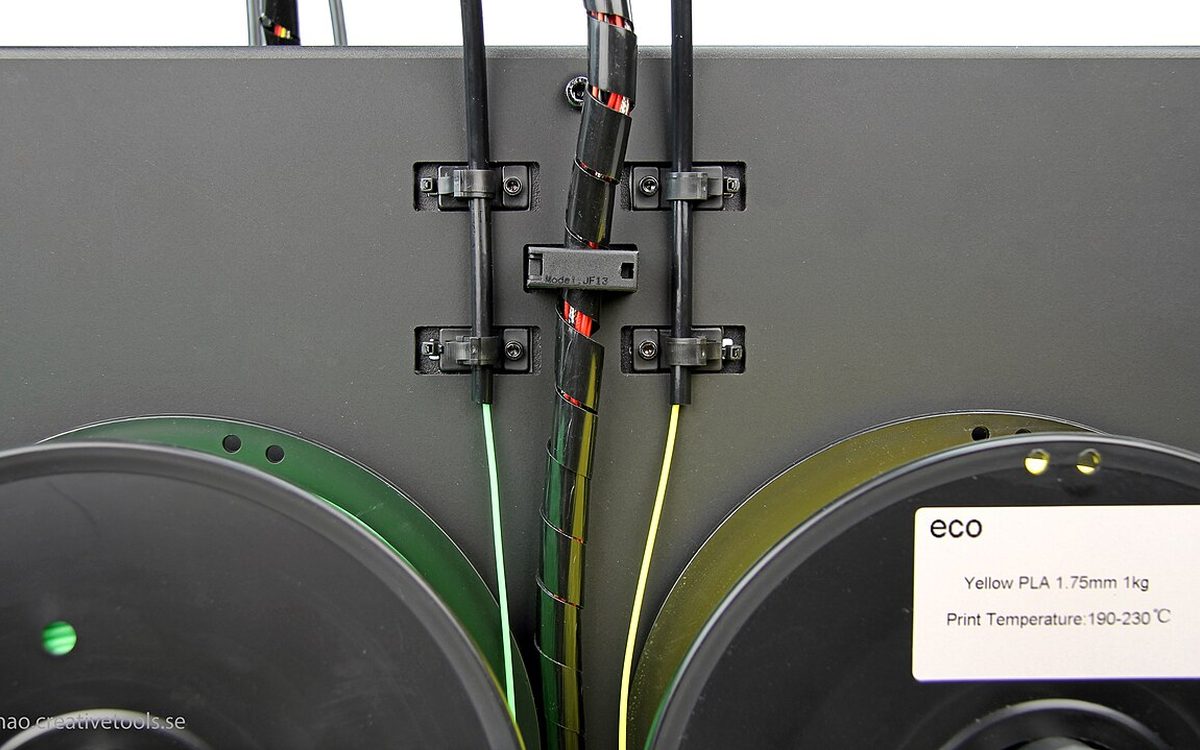
Multicolor FDM printing is splitting into two camps. One camp keeps a single nozzle and swaps filament through it, purging the old color every time. The other gives each color its own nozzle or its own toolhead. In September and October 2026 the second camp suddenly got crowded: Creality opened pre-orders for the four-nozzle K3, Sovol is taking pre-orders for the seven-tool M1D, and Bambu Lab has scheduled a nine-tool H3C for November 3. This guide explains how each approach works, what it costs you in filament and time, and how to pick one for the kind of work you actually print.
What changed this autumn
The short version: tool changing is moving from enthusiast machines into the mid-price range.
- Creality K3. Pre-orders opened on October 13 at $849 in the US. Its KliTek system keeps four filaments in independent channels and switches between lightweight nozzle assemblies in about five seconds. Creality claims up to 80% shorter total print time and up to 85% less waste than single-nozzle multicolor workflows, and lets you mix 0.2, 0.4, 0.6 and 0.8 mm nozzles in one print. European availability is expected in December (Creality press release).
- Creality SPARKX i8. Shown alongside the K3 at IFA Berlin, it takes a different route: four filaments feed one shared hotend (QuarTeks), with a shared path under 1 mm and channel switches in under a second. Final pricing was not announced (Fast3DPrinters).
- Bambu Lab H3C. Bambu has confirmed a November 3 launch for a tool changer with nine tools on a drop-down rack at the front of the chamber. Most specifications are still unannounced (Tom's Hardware).
- Sovol M1D. An open-source IDEX printer with one fixed toolhead plus six swappable ones, five-second swaps and up to seven colors or materials. Sovol lists it as a pre-order at $1,499, against a regular price of $1,799 (Sovol).
- Filament swappers keep getting cheaper. Creality's Ender-3 V3 Mega and Neo combos add four-color printing through the CFS Nano feeder, at early-bird prices of $669 and $329 until November 10 (Creality press release).
3DPrint.com's IFA report summed up the trend: several makers, including Flashforge with the four-toolhead Creator 5 Pro and MOVA with its H1, are chasing faster color changes with less wasted material.
Five ways to print in more than one color
"Multicolor" now covers very different hardware. These five groups behave differently in daily use.
1. Single nozzle with a filament changer
Bambu Lab AMS, Creality CFS, Prusa MMU and similar units feed several spools into one hotend. At every change the printer cuts or retracts the old filament, loads the new one, and pushes enough plastic through the nozzle to flush the old color out. That purge is the waste you see as "poop" or a prime tower. It is cheap hardware and supports many colors, but each change costs time and grams.
2. Several channels into one hotend
The SPARKX i8 keeps four filaments loaded at the entrance of a single melt zone. Because the shared path is very short, much less old color needs to be flushed. It is still one nozzle, so all four filaments must be happy at a similar temperature.
3. Two fixed nozzles
The Bambu Lab X2D (from $649, launched in April) and the larger H2D carry two nozzles on one toolhead. Two materials print with no purging between them. The classic use is support: the X2D's auxiliary nozzle prints the support material so it peels off cleanly (Bambu Lab blog). Beyond two colors, you are back to filament swapping on one of the nozzles.
4. Nozzle or hotend swapping
The toolhead stays on the printer; only the nozzle or hotend is exchanged. Bambu's H2C uses its Vortek system: one fixed nozzle plus a rack of six induction-heated hotends, which gives seven melt zones in one job. Creality's K3 also swaps nozzle assemblies. These machines get most of the waste savings of a tool changer while keeping one extruder and one set of motion parts.
5. Full tool changers
Each tool is a complete toolhead with its own extruder and hotend, parked until needed. The Snapmaker U1 has four toolheads that swap in about five seconds using steel-ball kinematic couplings; Snapmaker says the mechanism passed over 1,000,000 continuous swap tests, and the build volume is 270 × 270 × 270 mm (Snapmaker). The Sovol M1D, Prusa XL, Flashforge Creator 5 Pro and Bondtech's INDX kit for the Prusa CORE One fall into this group too.
Comparison at a glance
| Approach | Example machines | Purge per change | Change time | Materials in one job | Main trade-off |
|---|---|---|---|---|---|
| Filament changer, one nozzle | AMS / CFS / MMU setups | High | Slow (cut, load, flush) | Many colors, similar temps | Waste and time grow with every change |
| Multi-channel hotend | Creality SPARKX i8 | Low (very short shared path) | Under 1 s (claimed) | Up to 4, similar temps | Still one nozzle and one temperature |
| Two fixed nozzles | Bambu X2D, H2D | None between the two | Near instant | 2 without purge | Third color means swapping again |
| Nozzle/hotend swapper | Bambu H2C, Creality K3 | Very low | About 5 s on K3 | 4 to 7 | Spare hotends cost extra; new mechanisms |
| Full tool changer | Snapmaker U1, Sovol M1D, Prusa XL | Very low | About 5 s on U1 / M1D | 4 to 7+ | Price, calibration, idle-nozzle ooze |
The numbers in the table are manufacturer claims, not our measurements. Treat them as upper limits until independent reviews confirm them.
Where the waste really comes from
The cost of a filament changer is easy to estimate before you buy anything. Slice a typical multicolor job in Bambu Studio or OrcaSlicer and look at the filament summary: it lists the model, the flushed filament and the prime tower separately.
The rule behind it is simple. Waste is roughly the number of color changes multiplied by the flush volume per change. Changes happen per layer, not per object, so:
- A tall model with color on every layer creates hundreds of changes.
- A flat sign with color only in the top few layers creates very few.
- Ten copies on one plate share the same changes, so waste per part drops a lot.
As an illustration, if your slicer shows 400 changes and around 0.2 g flushed per change, that is about 80 g of plastic in the bin for one plate. On a nozzle-swapping or tool-changing printer, the same job wastes only a small prime tower, because each color stays in its own hotend.
If you already own a filament changer, these slicer settings cut waste without new hardware:
- Flush into infill or into support. The purged plastic goes inside the part, where color does not matter.
- Flush into a sacrificial object. Add a small part you need anyway and let it absorb purges.
- Move color to the surface. Put color only on the top layers or a thin outer shell, and print the rest in one color.
- Batch parts. Fill the plate with copies so each change serves more parts.
- Tune flush volumes. Light-to-dark changes need less flushing than dark-to-light; most slicers let you edit the flush matrix.
The hidden costs of tool changers
Fewer purges do not mean zero work.
- Calibration. Every tool needs an XY and Z offset. Most new machines calibrate automatically, but a crash or a nozzle change means recalibrating.
- Idle-nozzle ooze. A parked hot nozzle can drip. Printers handle this with standby temperatures, wipes and small prime towers, so expect a little waste, not none.
- More parts to maintain. Four to seven hotends means more nozzles to clean, more thermistors and more places for a clog. Bambu's induction hotends for the H2C are sold separately as spares, which adds up if you want several nozzle sizes.
- Build volume. On multi-nozzle machines the usable volume can shrink when every tool must reach the whole part. Check the "all tools" volume, not just the headline figure.
- Software maturity. Multi-tool slicing profiles are still being refined. PrusaSlicer 3.0's preview, for example, rebuilt its profile system around multi-tool printers, which shows how much is still changing.
Which approach fits your work?
Ask these questions before you spend money:
- How often do you print in more than one color? If it is a few times a month, a filament changer plus the settings above is enough.
- Do you need two materials, or many colors? Soluble or breakaway support, or a rigid part with a TPU grip, is a two-material job. A dual-nozzle printer solves it cheaply.
- Are colors mixed through the whole height of the part? Figurines, multicolor miniatures and character models change color on almost every layer. That is where tool changers save the most.
- Will you mix temperatures? PLA with TPU, or PETG supports under PLA, works best when each material has its own hotend.
- What is your humidity like? More spools loaded at once means more filament exposed to air. In a humid city like Da Nang, a tool changer with four open spools needs dry boxes; see our guide to storing and drying filament in a humid climate.
- Can you wait? The H3C launches on November 3 and the K3 only reaches Europe in December. Prices and reviews will look different in a few weeks.
Our take
At Lightning Lab most jobs are still single-color functional parts, architecture models and prototypes. For those, a reliable single-nozzle printer remains the best value. Multicolor matters for signage, character figurines and student projects, and those are exactly the prints where per-layer color changes make filament changers wasteful.
Our practical advice for small studios and makers in Vietnam:
- If you mainly need clean supports or rigid-plus-flexible parts, a dual-nozzle machine such as the X2D covers it at a mid-range price.
- If you print four-color figurines every week, a tool changer pays back in filament and hours, but wait for independent reviews of the K3 and the H3C before committing.
- If you already own an AMS or CFS, tune your flush settings and batch your plates first. It costs nothing and often halves the waste.
We will test multicolor jobs on new hardware as it becomes available and share real numbers rather than spec-sheet claims.
Sources
- Creality K3 opens for pre-order at $849 (PR Newswire, Oct 13, 2026)
- Creality launches Ender-3 V3 Mega Combo at $669 (PR Newswire, Oct 15, 2026)
- IFA 2026 shows where multicolor 3D printing is headed (3DPrint.com)
- Creality K3 and SPARKX i8 aim to make multicolor printing practical (Fast3DPrinters)
- Bambu Lab teases H3C tool changer for November 3 (Tom's Hardware)
- Bambu Lab presents the X2D (Bambu Lab blog)
- Snapmaker U1 product page (Snapmaker)
- Sovol M1D product page (Sovol)
Need a multicolor model, signage or a batch of figurines printed in Da Nang? Lightning Lab can advise on the right method and quote the job: email lab@lightning-studio.org or visit https://lightning-studio.org/lab/.
Cover photo: WanHao Duplicator4S Bild14.jpg) by Creative Tools from Halmstad, Sweden, CC BY 2.0, via Wikimedia Commons (cropped).
Related posts
3D Printing in Education: A Practical Guide for Teachers and Schools
What to print for teaching, STEM projects students can design themselves, classroom safety, budgeting and a simple lesson flow from sketch to printed part.
3D Printing Cosplay Props: Splitting, Finishing and Wearability
How to split big props to fit the bed, key and join the pieces, pick PLA, PETG or resin, keep shells light, then fill, paint and pad them for wearing.
From Photo or Sketch to a Printable 3D Model
What to send, how designers model functional parts vs figures, what 3D scanning can and cannot do, and why design is quoted separately from printing.