Start with what the part has to do
Most design requests we get start with a phone photo: a broken clip, a sketch on squared paper, a figure from a game, or a product idea described in three sentences. All of these can become a printable model, but how fast and how accurately depends on what you send and what kind of object it is.
The first question a designer asks is not 'what does it look like' but 'what does it have to do'. A bracket that must fit an existing shelf needs exact dimensions on a few critical faces. A decorative figure needs the right proportions and character, but nobody will measure it with calipers. Tell us which one you have, because it decides the whole workflow.
What to send
For functional parts
- Photos from several angles: front, side, top, and one at an angle. Shoot straight on where you can, so perspective does not distort the shape.
- A scale reference in the photo: a ruler or a cutting mat next to the part, on the same plane. A coin works in a pinch, but a ruler is better.
- Key dimensions written down: overall length, width and height, hole diameters and the distance between hole centres. Measure with calipers if you have them, and say which numbers are exact and which are guesses.
- What it mates with: the screw size, the tube it slides onto, the slot it clips into. A part that fits 'roughly' rarely fits at all.
- How it is loaded and where it lives: in the sun on a motorbike, in a hot kitchen, carrying weight, bending. This affects both the design and the material.
For sketches and ideas
- A sketch with front, side and top views is worth more than one artistic perspective drawing. It does not need to be pretty; squared paper with dimensions in mm is ideal.
- Overall size of the finished print. 'About the size of my palm' is a start; '120 mm tall' is better.
- Reference images for style: two or three pictures of similar objects and a note on what you like in each.
- Must-haves vs nice-to-haves. A box that must hold a specific phone is a must-have; rounded corners are a nice-to-have.
For figures and characters
- Front and side references of the character (turnaround sheets are perfect), the pose you want, the height, and whether it will be painted. Fine details like faces and hair usually point to resin; we explain the trade-offs in FDM vs resin.
What a designer actually does
There are two very different kinds of 3D modelling, and they use different tools.
CAD (parametric) modelling is for functional and geometric parts: brackets, enclosures, adapters, replacement parts, architectural shapes. The model is built from sketches, dimensions and features like extrude, fillet and hole. The big advantage: if a dimension is wrong, the designer changes one number and the model updates. This is how you get a 6.2 mm hole exactly where it needs to be.
Digital sculpting is for organic shapes: figures, creatures, faces, sculptural decor. The designer works like a sculptor with virtual clay. It is great for character and flow, but it is not dimension-driven, so it is the wrong tool for a part that has to fit a screw.
Many projects mix both: a sculpted figure on a CAD-designed base with a pocket for a magnet, or a product enclosure with a sculpted grip.
Whichever method is used, the designer also has to make the model printable: closed (watertight) geometry, walls thick enough to print, features no smaller than the printer can reproduce, and a sensible way to orient and support it. We cover those rules in preparing a 3D model for printing and supports, overhangs and print orientation. A good designer bakes them in from the start, for example by adding a flat base, or splitting a figure at the waist so it prints without supports across the face.
Photogrammetry and 3D scanning: useful, with limits
People often ask whether we can 'just scan it'. Sometimes, and it is worth knowing what scanning actually gives you.
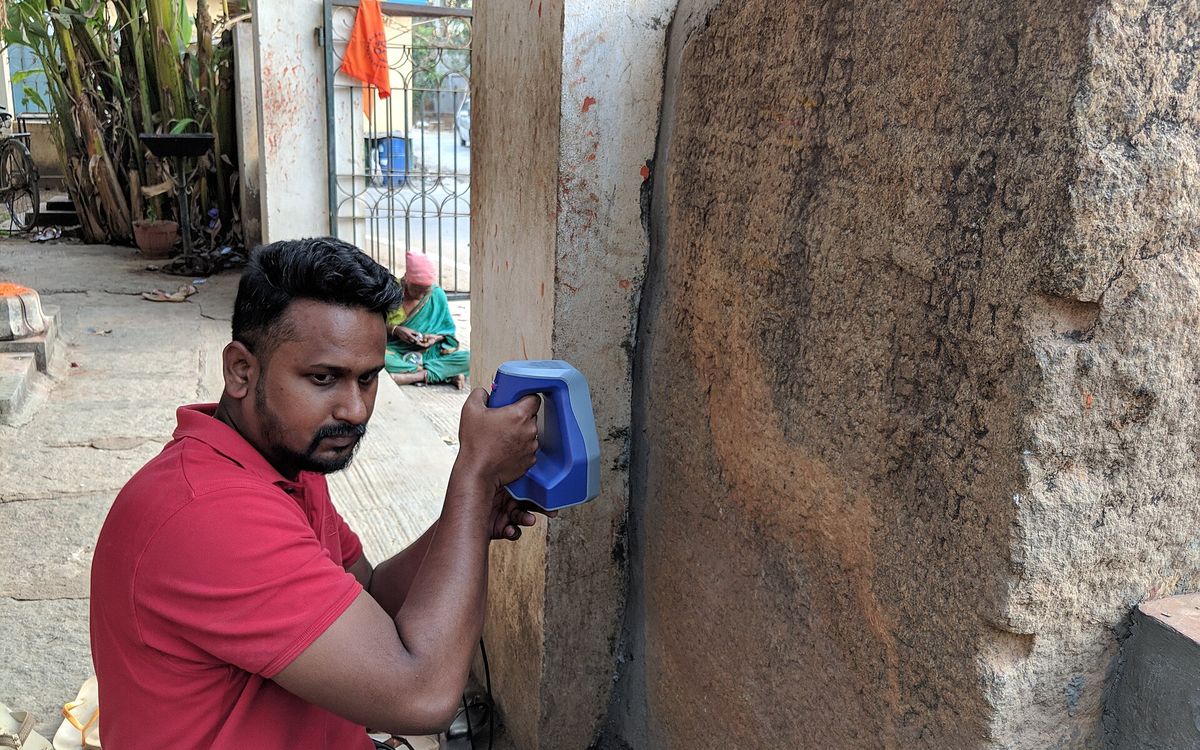
Photogrammetry builds a 3D mesh from many overlapping photos (typically dozens) taken around an object. 3D scanners use structured light or lasers. Both produce a mesh of the surface, not a clean, editable design.
What they do well:
- Capturing organic shapes that are hard to model by hand: a sculpture, a body part for a fitted prop, a worn handle.
- Providing a reference to design around, for example a scan of a dashboard so a CAD-modelled mount follows its curve.
Where they struggle:
- Shiny, transparent and very dark surfaces confuse both methods. Objects are often sprayed with a temporary matte coating first.
- Thin features, holes and deep pockets come out blobby or missing.
- Accuracy: phone photogrammetry is fine for shape, not for tolerances. Do not expect a scanned clip to snap into place without redesign.
- Scale: photogrammetry has no absolute scale unless a reference of known size is in the scene.
- Cleanup: holes filled, noise smoothed, and the mesh made watertight before it can be sliced.
For a functional replacement part, measuring and modelling in CAD is usually faster and more accurate than scanning. For a figure or a free-form shape, a scan can be a strong starting point.
Revisions: how the back-and-forth works
Expect at least one round of revisions. A typical flow:
- Brief and questions. We read what you sent and ask about anything unclear before modelling starts.
- First draft. You get screenshots or renders from a few angles, with key dimensions marked for functional parts.
- Feedback. Be specific: '5 mm taller', 'hole 2 mm further from the edge', 'thinner neck'. Mark up a screenshot if that is easier.
- Revised model. One or two rounds is normal for simple parts; characters and multi-part products take more.
- Test print for fit-critical parts. For anything that has to mate with something else, a quick print of just the critical section, such as a thin slice through the hole pattern, saves time and filament. See tolerances for functional parts for why holes and fits need testing.
- Final files and print.
Changes are cheap early and expensive late. Moving a hole on a sketch is a minute of work; changing the pose of a finished sculpt can mean starting over. Settle the big decisions (size, pose, how it splits into parts) in the first round.
How design is quoted
Design and printing are separate costs, and it helps to think of them that way.
- Design is quoted on the modelling work: how complex the shape is, how many parts, how much detail, and how many revisions are expected. A simple bracket from good measurements is a small job; a detailed character sculpt is a large one.
- Printing is priced like any other job: on print time and material used, as explained in what drives 3D printing cost.
Once a model exists, a reprint only needs printing, not design work again. If you will need ten copies, or a new colour later, that is often the real value of paying for a model once.
To get an accurate design quote quickly, send the photos, sketch, dimensions and intended use together in one message rather than spread across several.
Ready to turn your idea into a model?
Email lab@lightning-studio.org with photos or a sketch, the size you want and what the object needs to do; a shared Google Drive folder works well when there are many images. We will reply with questions and a design quote, then print it in the material that suits the job. More on the Lightning Lab page.
Cover photo: 3D Scanning of the Kodigehalli 1431CE Inscription of Prathaparaya's Donation to God Someyadeva by Mythic Society Inscriptions 3D Scanning Project, CC BY-SA 4.0, via Wikimedia Commons (cropped).
Related posts
3D Printing in Education: A Practical Guide for Teachers and Schools
What to print for teaching, STEM projects students can design themselves, classroom safety, budgeting and a simple lesson flow from sketch to printed part.
Tool Changers vs Filament Swappers: Choosing a Multicolor 3D Printer
Creality K3, Sovol M1D and Bambu's upcoming H3C bring tool changing to mid-range prices. How the five multicolor approaches compare on waste, time and cost.
3D Printing Cosplay Props: Splitting, Finishing and Wearability
How to split big props to fit the bed, key and join the pieces, pick PLA, PETG or resin, keep shells light, then fill, paint and pad them for wearing.