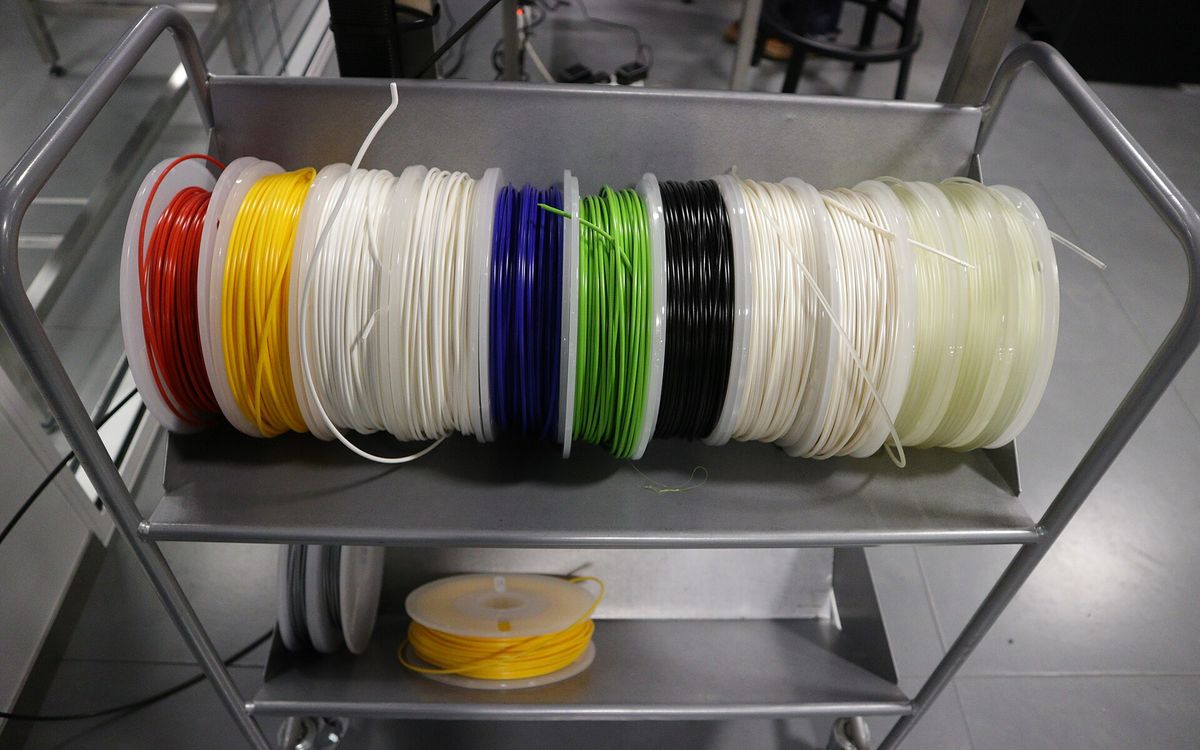
Picking a material is mostly about one question: what will this part go through? Heat, sunlight, impact, bending, or just sitting on a shelf. We print in PLA, PETG, ABS, TPU and resin at Lightning Lab, and each one has a clear job. The first four are FDM filaments. Resin is a different process altogether; if that distinction is new to you, start with FDM vs resin for beginners.
The temperatures below are typical ranges for common filaments. Exact values vary by brand and blend, so treat them as a guide, not a spec sheet.
PLA: the default for looks and prototypes
PLA is the easiest material to print and the one most parts start in. It prints at around 190 to 220 °C, needs little or no bed heating, and barely warps, so dimensions come out accurate and surfaces look clean.
Good for: display models, architecture models, early prototypes, figures, decor, gifts, jigs that stay indoors.
Watch out for:
- Heat. PLA starts to soften at roughly 55 to 60 °C. A PLA part left on a car dashboard in the Da Nang sun can sag or warp.
- Brittleness. It is stiff but does not like impact or repeated bending. It tends to snap rather than flex.
- Outdoor use. It degrades faster than PETG outdoors and is not a long-term choice for exposed parts.
PETG: the everyday functional plastic
PETG sits between PLA and ABS. It prints at around 230 to 250 °C with a bed of 70 to 85 °C, warps little, and comes out tougher and more heat resistant than PLA, softening at roughly 75 to 80 °C. It also handles moisture and many household chemicals well.
Good for: brackets, enclosures, clips, outdoor fixtures, water-adjacent parts, mechanical prototypes that need to take a knock.
Watch out for:
- Stringing. PETG tends to leave fine hairs between features. They clean up, but surfaces are less crisp than PLA.
- Slightly lower detail and a glossier, less matte look.
- Scratching. It is tough, but the surface marks more easily than ABS.
ABS: heat resistance and post-processing
ABS is an older engineering plastic, the same family used for many moulded consumer products. It prints hot, around 230 to 260 °C with a bed near 100 °C, and needs an enclosed printer to control warping. In return, it stays usable up to about 80 to 90 °C and is easy to sand, drill and glue.
Good for: parts near motors or electronics, car interior parts, enclosures that get warm, parts you want to smooth with acetone vapour.
Watch out for:
- Warping and cracking on large flat parts, as the plastic shrinks while it cools.
- Fumes. ABS gives off a noticeable smell during printing and needs ventilation. If you print it yourself, do not run it in a closed bedroom.
- UV. Untreated ABS can yellow and become brittle in strong sunlight over time.
Acetone smoothing gives ABS a glossy, almost injection-moulded finish. We cover the method and its safety precautions in the post-processing guide.
TPU: flexible and impact absorbing
TPU is a rubber-like filament. The common grade is around Shore 95A, about as firm as a skateboard wheel or a phone case. It prints at around 210 to 235 °C and has to be printed slowly so the soft filament does not buckle in the extruder.
Good for: phone and device cases, bumpers, gaskets, feet for furniture or equipment, grips, straps, vibration dampers.
Watch out for:
- Fine detail and tight tolerances are harder. Edges are softer and parts may need a little extra clearance.
- Print time. Slow speeds mean TPU parts take longer than the same shape in PLA.
- Moisture. TPU absorbs water from humid air, and wet filament prints with bubbles and stringing. Filament has to be kept dry, which matters in a humid climate like central Vietnam.
Resin: maximum detail
Resin is a liquid photopolymer cured by UV light, not a filament. It gives the finest detail and smoothest surface we offer, with layers down to 0.05 mm. Standard resin is hard and stiff but more brittle than any of the filaments above.
Good for: figures and miniatures, keycaps, small detailed parts, presentation models, jewellery-style pieces, anything that will be painted and looked at up close.
Watch out for:
- Brittleness. Thin parts can snap if dropped. Not ideal for clips or load-bearing parts.
- Sunlight. Long UV exposure can yellow parts and make them more brittle.
- Size and cost. Large solid parts use a lot of resin, so big pieces are usually hollowed.
See resin printing safety and care for handling and how to look after resin prints.
Comparison table
Ratings are relative, comparing these five materials with each other.
| Material | Ease of printing | Toughness | Heat resistance (approx.) | Flexibility | Detail | Typical uses |
|---|---|---|---|---|---|---|
| PLA | Very easy | Low to medium, brittle | ~55 to 60 °C | Stiff | Good | Display models, prototypes, decor |
| PETG | Easy | Medium to high | ~75 to 80 °C | Slight flex | Good | Functional parts, outdoor fixtures |
| ABS | Harder (enclosure) | High | ~80 to 90 °C | Slight flex | Good | Hot environments, smoothed parts |
| TPU | Harder (slow) | Very high, absorbs impact | ~80 °C+ | Rubbery | Fair | Cases, gaskets, bumpers, grips |
| Resin (standard) | Process dependent | Low, brittle | Varies, often modest | Stiff | Excellent | Figures, keycaps, fine detail |
Which one should you pick?
Work through these questions in order and stop at the first yes:
- Does it need to bend or absorb impact like rubber? TPU.
- Will it sit somewhere hot, near a motor, or in a car? ABS. PETG if it only gets warm.
- Will it be outside, near water, or take knocks? PETG.
- Is fine detail or a smooth painted finish the main goal? Resin.
- None of the above? PLA. It is the cheapest, fastest and most accurate place to start.
A few common cases from our orders:
- Architecture model for a studio review: white PLA for massing, resin for very small details. More in 3D printing architecture models.
- First prototype of a product enclosure: PLA for fit checks, then PETG or ABS for the version that gets tested.
- Custom keycaps or a figure as a gift: resin.
- Replacement foot or bumper for a device: TPU.
Colours and finishes
We stock 50+ materials and finishes, so colour usually does not limit the choice. Do keep in mind that very dark and very glossy filaments show layer lines more, while matte and lighter colours hide them. If the part will be painted, choose by mechanical needs and print it in a neutral colour such as grey or white.
For strength, material is only half the story. How the part is printed matters just as much, which we explain in infill, walls and strength.
Not sure which to choose?
Tell us what the part does and where it will live, and we will recommend a material. Share your file via a Google Drive link with lab@lightning-studio.org with the size and colour you want. You can find more about the service on the Lab page.
Cover photo: Helsinki, Oodi, 3D printer filament by Kalle, CC BY-SA 2.0, via Wikimedia Commons (cropped).
Related posts
3D Printing in Education: A Practical Guide for Teachers and Schools
What to print for teaching, STEM projects students can design themselves, classroom safety, budgeting and a simple lesson flow from sketch to printed part.
Tool Changers vs Filament Swappers: Choosing a Multicolor 3D Printer
Creality K3, Sovol M1D and Bambu's upcoming H3C bring tool changing to mid-range prices. How the five multicolor approaches compare on waste, time and cost.
3D Printing Cosplay Props: Splitting, Finishing and Wearability
How to split big props to fit the bed, key and join the pieces, pick PLA, PETG or resin, keep shells light, then fill, paint and pad them for wearing.