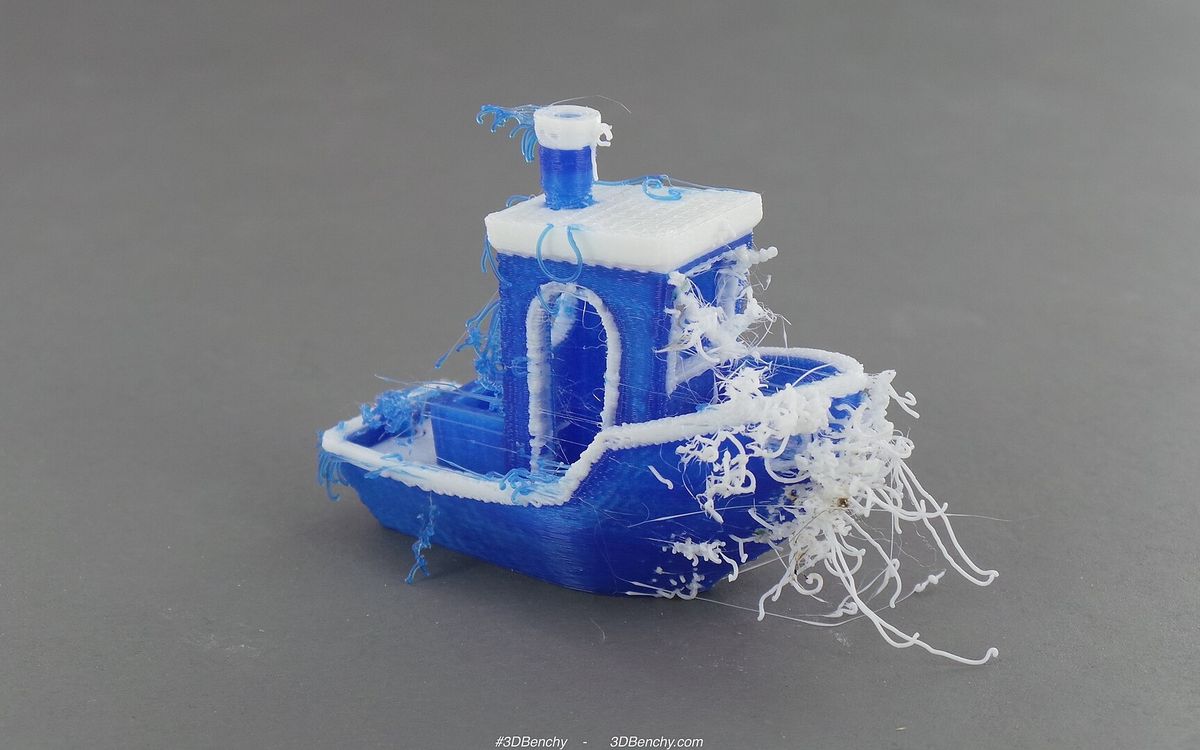
Most failed prints come from a short list of problems, and each one has a usual cause. This guide covers the defects we see most often on FDM and resin, what causes them and what to try first. Change one setting at a time and reprint a small test, otherwise you won't know which change fixed it.
Quick reference
| Defect | What it looks like | Most likely cause | Try first |
|---|---|---|---|
| Poor bed adhesion | First layer won't stick, print comes loose | Nozzle too high, dirty bed | Adjust Z offset, clean the bed |
| Warping | Corners lift and curl | Plastic shrinking as it cools | Brim, correct bed temp, no drafts |
| Elephant's foot | Bottom layers bulge outward | First layer squished too hard, bed too hot | Raise Z offset slightly, lower bed temp |
| Stringing | Thin hairs between features | Oozing during travel, wet filament | Dry filament, tune retraction and temp |
| Under-extrusion | Gaps, thin walls, weak parts | Partial clog, printing too fast, wet filament | Slow down, check nozzle and flow |
| Layer shift | Layers offset sideways | Loose belt, nozzle hitting the print | Tighten belts, fix curling |
| Resin: print not on plate | Print stuck to FEP or missing | Weak bottom layers, cold resin | Bottom exposure, warm resin, re-level |
| Resin: suction cup | Cracks, failed hollow parts | Hollow cavity sealed against FEP | Add vent holes, re-orient |
Poor bed adhesion
The first layer is the foundation for everything above it. Most adhesion problems come down to three things:
- Nozzle too far from the bed. The first layer should be pressed slightly flat, not laid on top as round strands. Lower the Z offset in small steps (0.02 to 0.05 mm) until the lines merge into a smooth sheet.
- Dirty bed. Fingerprints alone can stop PLA sticking. Wipe the plate with IPA, and wash PEI sheets with warm water and dish soap now and then.
- Too fast or too cold. Print the first layer slowly, around 20 to 30 mm/s is typical, and check the bed temperature for the material.
Typical bed temperatures are PLA 55 to 65 °C, PETG 70 to 85 °C and ABS 95 to 110 °C. PETG can bond too well to smooth PEI and tear pieces out of it, so a thin layer of glue stick is often used as a release layer.
Warping
Warping is corners lifting off the bed as the plastic cools and shrinks. It's worst with ABS, milder with PETG and usually small with PLA. Large flat parts with sharp corners suffer most.
Fixes, roughly in order:
- Get first-layer adhesion right (above).
- Add a brim of 5 to 10 mm. It adds contact area at the corners, where lifting starts.
- Stop drafts. A fan or an open window cooling one side of the print is a common cause. ABS really needs an enclosure to keep the air around the part warm.
- For ABS, reduce or turn off part cooling.
- In the design, round off sharp corners where you can.
Elephant's foot
The bottom few layers spread wider than the rest and form a lip. It spoils fits at the base and can fuse print-in-place parts.
- Raise the Z offset slightly. A first layer squished too hard pushes plastic sideways.
- Lower the bed temperature by about 5 °C. A hot bed keeps the lower layers soft under the weight above.
- Use the slicer's elephant's foot compensation if it has one.
- Add a small chamfer (0.4 to 0.5 mm) to bottom edges in the model to hide any bulge that remains.
Stringing
Fine hairs or webs between separate parts of the print, caused by plastic oozing from the nozzle while it travels.
- Dry the filament. Moisture is the most underrated cause. PETG and TPU absorb water from the air quickly, and humid climates like Vietnam's make it worse. Wet filament also pops and crackles as it prints. A few hours in a filament dryer, around 45 to 50 °C for PLA and 60 to 65 °C for PETG, usually helps.
- Tune retraction. Typical starting ranges are 0.5 to 2 mm for direct-drive extruders and 4 to 7 mm for Bowden setups. Too much retraction can cause jams, so change it in small steps.
- Lower the temperature by 5 to 10 °C, staying inside the material's range.
- Travel faster, and enable the slicer option that avoids crossing perimeters.
Some stringing on PETG is normal. A quick pass with a heat gun removes fine hairs.
Under-extrusion
The printer isn't pushing out enough plastic. Signs are gaps between lines, missing layers, thin or spongy walls and weak top surfaces.
Common causes:
- Partial clog. Debris or burnt material in the nozzle. A cold pull (heat the nozzle, push filament through, let it cool partly, then pull it out firmly) often clears it. If not, replace the nozzle.
- Printing faster than the hotend can melt. A hotend can only melt so much plastic per second. If the problem appears mainly on fast infill, slow down or raise the temperature within range.
- Wet or inconsistent filament. Moisture or uneven diameter causes uneven flow.
- Extruder slipping. Look for ground-up filament dust on the drive gear, and check the tension.
- Spool tangles or friction. A knotted spool or a tight filament path starves the extruder.
- Wrong slicer settings. Filament diameter (1.75 vs 2.85 mm) or flow rate set incorrectly.
Under-extrusion is a strength problem, not just a looks problem. A part with gaps between perimeters is much weaker than its walls and infill settings suggest.
Layer shifts
Part way up, the print suddenly steps sideways, as if the model were cut and slid over.
- Loose belts or pulleys. Belts should be taut. Check the small grub screws that hold pulleys on the motor shafts.
- Nozzle collisions. Curled overhangs or warped corners can catch the nozzle. Fix the curling, or enable Z-hop on travel moves.
- Too much speed or acceleration for the machine, so the motors skip steps.
- An unstable surface. A wobbly table can make a fast printer shift.
If the shift happens at the same height every time, look at the model at that height: there is often a sudden overhang or the top of a support there.
Resin: print not on the build plate
On a resin printer, a failure usually means the print stuck to the FEP film in the vat instead of the build plate.
- Bottom layers. The first layers need longer exposure to bond to the plate. Check bottom layer count and exposure against the resin maker's recommendation.
- Cold resin. Resin thickens and cures poorly when cold. Aim for roughly 20 to 30 °C. A room with air conditioning running overnight can be cold enough to matter.
- Plate levelling, and a lightly sanded plate surface for grip.
- Worn FEP. Cloudy, scratched or dented film should be replaced.
After any failed resin print, clear cured debris from the vat before printing again, or it can damage the FEP or screen.
Resin: suction cups and hollow parts
A hollowed model with its open side facing down can seal against the FEP like a suction cup. Each peel then pulls hard on the print, causing layer separation, distorted walls or outright failure. Resin trapped inside a sealed hollow can also crack the part later.
- Add drain and vent holes of at least 2 to 3 mm, one near the build plate and one near the top, so air and resin can flow.
- Angle the model so cavities don't sit flat against the FEP.
- Avoid large flat areas parallel to the plate. Tilting them reduces peel force.
More on orientation is in supports, overhangs and orientation, and safe handling of failed resin prints in the resin safety guide.
Need it printed?
If a print keeps failing on your machine, or you'd rather skip the troubleshooting, send the file to lab@lightning-studio.org with the size, material and colour you want, and we'll print it for you. The Lab page explains how ordering works.
Cover photo: Dual-print multi-part color 3D print of -3DBenchy v31 (19672643310) by 3DBenchy, CC BY 2.0, via Wikimedia Commons (cropped).
Related posts
3D Printing in Education: A Practical Guide for Teachers and Schools
What to print for teaching, STEM projects students can design themselves, classroom safety, budgeting and a simple lesson flow from sketch to printed part.
Tool Changers vs Filament Swappers: Choosing a Multicolor 3D Printer
Creality K3, Sovol M1D and Bambu's upcoming H3C bring tool changing to mid-range prices. How the five multicolor approaches compare on waste, time and cost.
3D Printing Cosplay Props: Splitting, Finishing and Wearability
How to split big props to fit the bed, key and join the pieces, pick PLA, PETG or resin, keep shells light, then fill, paint and pad them for wearing.