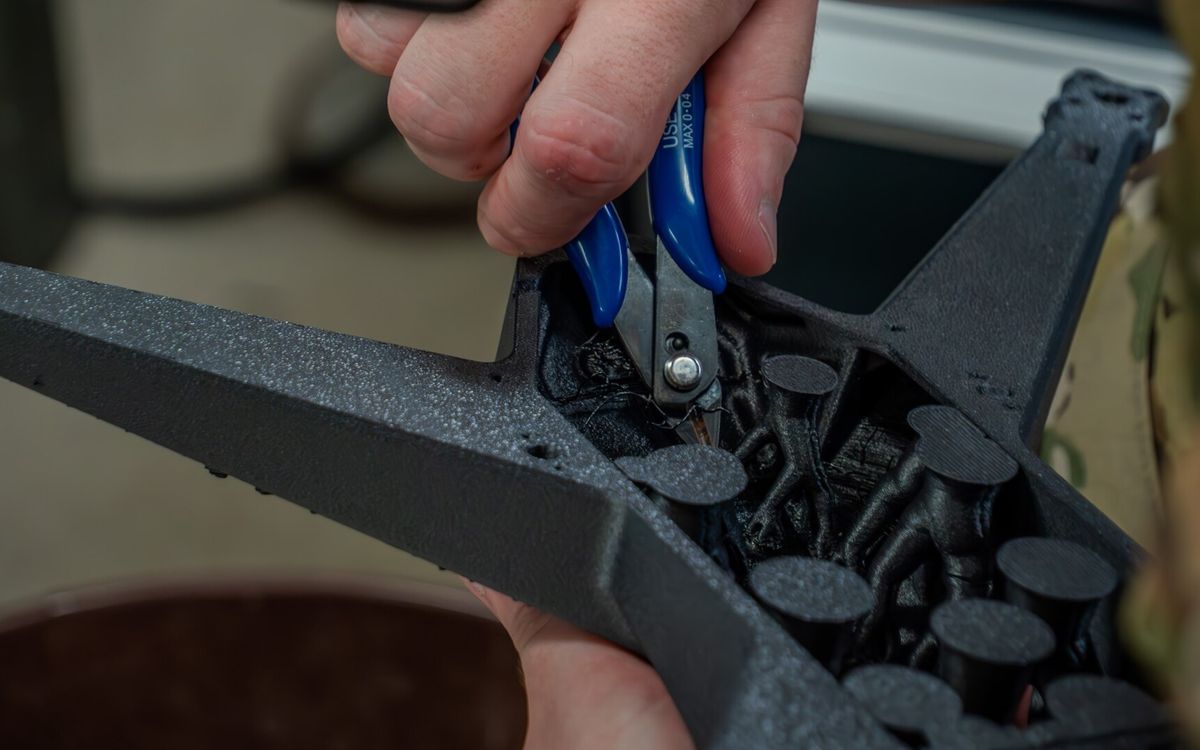
Every FDM print is built from the bottom up, and every layer has to sit on something. Supports, overhangs and orientation are really one question: what is under each layer, and what happens where there is nothing?
Overhangs and the 45° rule
An overhang is any part of a layer that sticks out past the layer below. Each new line is slightly wider than the step it makes, so a gentle overhang is held up by the line under it. As the angle gets steeper, less of each line rests on plastic and more of it hangs in the air.
The common rule: overhangs up to about 45° from vertical print without support. Past that, the underside starts to droop, curl and look rough. With good part cooling and PLA, many printers handle 50–60°. With PETG or ABS, which are printed with less fan, the safe limit is often lower.
Design tips that avoid supports:
- Replace a horizontal ledge with a 45° chamfer.
- On bottom edges, use chamfers instead of fillets. A fillet starts almost horizontal and droops. A chamfer starts at 45°.
- Horizontal holes print as overhangs at the top. Small ones, under about 10 mm, usually print fine. Larger ones can be given a teardrop or diamond-shaped top.
Bridges
A bridge is a horizontal span between two supported points, like the top of a doorway. The printer stretches a strand of plastic across the gap and cools it quickly so it does not sag.
Short bridges of 10–20 mm usually print cleanly. Longer spans sag more, depending on material, cooling and speed. The first layer of a bridge always looks a little rough underneath, while the layers above it print normally. If the underside of a long bridge matters, support it or reorient the part.
Support types
When something has to hang over open air, the slicer builds temporary structures under it.
Normal (grid or line) supports
Columns built straight down from the overhang to the bed or to the model. They are reliable and simple, and good for flat overhangs and large areas. The downsides: they use more material, can be hard to remove from tight spaces, and leave marks wherever they touch the model.
Tree supports
Branches that grow from a few points and split out to hold the overhang. They touch the bed and the model in fewer places, use less material and are often easier to remove. They suit figures, organic shapes and parts where supports would otherwise land on visible surfaces. For large flat overhangs, normal supports are often more stable.
Settings that matter
- Z distance: the gap between the top of the support and the part, often about one layer height (0.2 mm at 0.2 mm layers). Smaller gives a cleaner underside but supports that are harder to remove.
- Interface layers: a dense roof on top of the support gives a smoother surface on the part.
- Support blockers and enforcers: add support only where it is needed. Automatic supports often appear in places that would print fine without them.
- Build plate only: supports start only from the bed, not from the model, which avoids scars on the part itself.
Wherever supports touch, the surface will be rougher than the rest of the part. Plan for it: put supports on faces that will be hidden, sanded or glued. Our post-processing guide covers clean removal.
Orientation: the decision that matters most
How a part sits on the bed affects strength, surface finish, support needs and print time, often more than any other setting.
Strength
FDM parts are anisotropic: strongest along the layer lines and weakest between layers. Pull a part apart in the Z direction and it tends to split cleanly along a layer. Strength across layers is typically noticeably lower than along them, and how much lower depends on material and settings.
So orient parts so the main load runs along the layers, not across them. Classic examples:
- A hook or L-bracket printed standing up will snap at the bend. Lying on its side, the layers run around the bend and it is much stronger.
- A peg printed vertically breaks off easily at the base. Printed lying down, it is far tougher, though it may need a flat side or a little support.
- Snap-fit arms should flex along the layer lines, not across them.
Our infill and walls guide explains anisotropy in more detail.
Surface finish
- The bottom face takes the texture of the bed, smooth or textured. It is flat and clean, but watch for elephant's foot.
- Top faces are smooth if there are enough top layers.
- Vertical walls show fine, even layer lines.
- Shallow curved surfaces show stepping, see layer height explained.
- Supported faces are the roughest.
Put the face you care most about on top or vertical, and never on supports.
Accuracy
Round holes print most accurately when their axis is vertical, because the hole is drawn as a circle in each layer. Holes printed horizontally come out slightly oval and tighter at the top. If a hole must fit a bearing or a shaft, orient it vertically if you can. More on fits in tolerances for functional parts.
Time and bed adhesion
Taller orientations take more layers and so more time, and tall narrow parts are more likely to wobble or get knocked loose. A large flat face on the bed helps adhesion and reduces the risk of warping.
Splitting models
Sometimes no orientation works. A figure with outstretched arms, a full architectural model or a part bigger than the build plate is often better printed in pieces.
- Cut along natural seams: where a hat meets a head, or between the floors of a building.
- Add alignment features such as pins and holes or a key and slot, so the parts line up when glued. Around 0.2 mm clearance per side is a typical starting point.
- Each piece can then sit on its own best face, with few or no supports.
- Gluing and filling a seam takes time, but often less than cleaning up heavy supports.
Most slicers have a cut tool, and some can add connectors automatically. For building models, see our guide to architecture models for students.
Resin is different
Resin parts hang upside down from the build plate and are peeled off the film above the screen on every layer, so the rules change. Parts are usually tilted around 30–45° to reduce the area of each layer, and held up by many thin contact points. Large flat faces parallel to the screen are best avoided, and hollow parts need drain holes so they do not trap resin or act like suction cups. See common defects and fixes.
Need it printed?
If you are not sure how a part should be oriented or split, send it anyway and tell us what it is for. We will choose the orientation and supports and flag anything that might cause problems. Share a Google Drive link with lab@lightning-studio.org or visit the Lab page.
Cover photo: 1st Air Cavalry Brigade 3D-printed small unmanned aircraft system (9172058), U.S. Army photo by Spc. Steven Day, Public domain, via Wikimedia Commons (cropped).
Related posts

3D Printing in Education: A Practical Guide for Teachers and Schools
What to print for teaching, STEM projects students can design themselves, classroom safety, budgeting and a simple lesson flow from sketch to printed part.
Tool Changers vs Filament Swappers: Choosing a Multicolor 3D Printer
Creality K3, Sovol M1D and Bambu's upcoming H3C bring tool changing to mid-range prices. How the five multicolor approaches compare on waste, time and cost.

3D Printing Cosplay Props: Splitting, Finishing and Wearability
How to split big props to fit the bed, key and join the pieces, pick PLA, PETG or resin, keep shells light, then fill, paint and pad them for wearing.