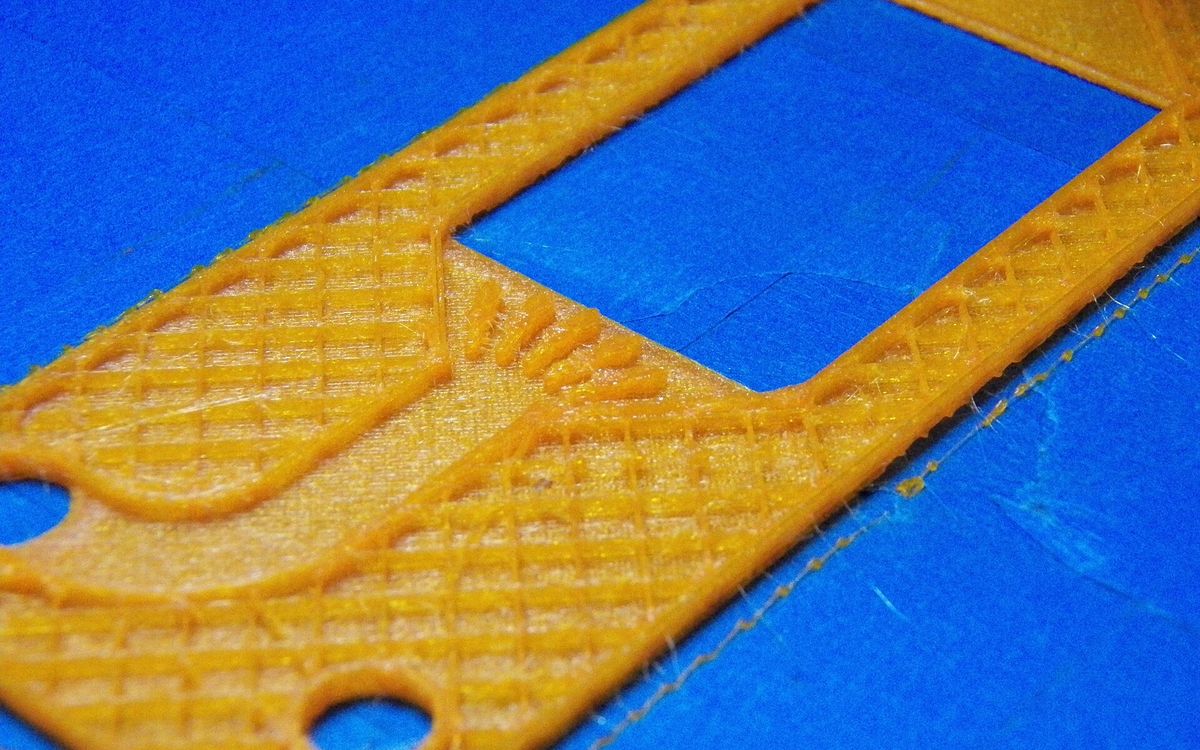
The first setting most people reach for when they want a stronger print is infill percentage. It is rarely the most effective one. Here is how the inside of an FDM print is built and where its strength really comes from.
How a print is built inside
The slicer splits each layer into three kinds of path:
- Walls (also called perimeters or shells): the outlines that trace the outer surface and any holes.
- Top and bottom layers (skins): solid layers that close the part off at the top and bottom.
- Infill: the internal structure in between, usually a repeating pattern at a set density.
A part with 2 walls, 4 top layers and 15 % infill is mostly air inside. That is fine for most uses, and it saves a lot of material and time.
Walls matter more than infill
When a part bends or twists, the highest stresses are at the outer surface. That is where the walls are. Adding walls puts material exactly where the load is, while infill sits near the centre, where it does the least.
Typical wall settings with a 0.4 mm nozzle:
- 2 walls (about 0.8 mm): decorative parts, models, low-load items.
- 3 walls (about 1.2 mm): a good default for most prototypes and general parts.
- 4–6 walls (1.6–2.4 mm): brackets, mounts, anything that takes real load or has screws driven into it.
Walls also matter for fasteners: threads bite into walls, not infill. For holes that take screws or heat-set inserts, 3–4 walls give the plastic something solid to grip. See tolerances for functional parts.
For many parts, going from 2 to 4 walls adds more strength than going from 20 % to 50 % infill, and costs less time.
Top and bottom layers
Top layers are printed over infill, so they need enough thickness to bridge the gaps and form a smooth, closed surface. Too few and you get pillowing: small holes or bumps where the infill pattern shows through.
A common target is about 0.8–1.2 mm of solid top skin, which is 4–6 layers at 0.2 mm. Low infill needs more top layers, because the gaps to bridge are wider. Bottom layers usually run 3–4 layers (0.6–0.8 mm). Like walls, solid skins add stiffness because they sit at the outer surface.
Infill percentage
| Infill | Typical use |
|---|---|
| 0–10 % | Decorative models, vases, display pieces |
| 15–20 % | The usual default: prototypes, enclosures, general parts |
| 25–40 % | Functional parts under moderate load |
| 50 % and up | Heavy-duty parts, parts that will be drilled or tapped |
| 100 % | Rarely needed: small, highly loaded parts |
Strength does not rise in a straight line with infill. Going from 10 % to 30 % makes a clear difference. Going from 60 % to 100 % adds a lot of time and material for a smaller gain. Very high infill also packs in more heat and internal stress, which can make warping worse in materials like ABS.
Infill patterns
Slicers offer many patterns. The ones worth knowing:
- Grid: two sets of lines crossing in each layer. Fast and simple. Because the lines cross within the same layer, the nozzle passes over lines it has just laid, which can cause bumping at higher densities.
- Lines (rectilinear): lines in one direction per layer, alternating each layer. Fast, but weaker than grid at the same density.
- Triangles: stiff in the plane of the layer, good for parts loaded from the sides.
- Cubic and similar 3D patterns: cubes tilted onto a corner, so the structure resists load in all three directions. A good general choice for functional parts.
- Gyroid: a continuous wavy structure with similar strength in all directions, no crossing lines within a layer, and good support for top layers. Our usual pick for functional parts and for flexible TPU.
- Honeycomb: strong but slow, because of the many direction changes.
- Lightning: a tree-like structure that only holds up the top surfaces. Very fast and light, but it adds almost no strength. Ideal for display models.
If in doubt: gyroid or cubic for parts that do a job, lightning or low-density grid for parts that only need to look right.
Anisotropy: the direction problem
FDM parts are not equally strong in all directions. Within a layer, the lines of plastic are continuous and strong. Between layers, strength depends on how well each new layer fuses to the one below. As a result, parts are typically weakest when pulled or bent so that the layers separate, which is the Z direction.
This is the main limit on strength, and no infill setting fixes it. What helps:
- Orientation: put the load along the layers. A bracket lying flat is far stronger than the same bracket standing up. See our orientation guide.
- Temperature: printing toward the hotter end of a material's range improves layer bonding. PLA is typically printed around 195–220 °C, and the upper part of that range usually bonds better.
- Cooling: less fan improves bonding for PETG and ABS, at some cost to overhangs.
- Layer height: moderate layers, around 0.2 mm on a 0.4 mm nozzle, bond well. See layer height explained.
- Material: PETG and ABS are usually tougher under impact than PLA, while PLA is stiffer but more brittle. See the material guide.
Resin parts are much closer to equally strong in all directions, because each layer is cured into the one below, but they are usually more brittle than FDM parts.
Recommended starting points
| Part type | Walls | Top / bottom layers | Infill |
|---|---|---|---|
| Display model, figure | 2 | 4 / 3 | 5–10 %, lightning or grid |
| General prototype, enclosure | 3 | 5 / 4 | 15–20 %, gyroid or cubic |
| Bracket, mount, clip | 4–5 | 6 / 5 | 30–40 %, gyroid or cubic |
| Small part under heavy load | 5–6 | 6 / 6 | 50 % or more |
| Flexible TPU part | 2–3 | 4 / 4 | 10–20 %, gyroid |
These are starting points at 0.2 mm layers, not rules. More walls, more infill and more solid layers all add print time and material, so they also change the price. See 3D printing cost explained.
Need it printed?
Tell us what the part has to do: hold a load, take screws, flex, or just look good. We will set walls, infill and orientation to match, and suggest a material. Send a Google Drive link to lab@lightning-studio.org or see the Lab page.
Cover photo: 3D Printed RFB cell frame printed on Prusa i3 by hdaniel, CC BY-SA 2.0, via Wikimedia Commons (cropped).
Related posts
3D Printing in Education: A Practical Guide for Teachers and Schools
What to print for teaching, STEM projects students can design themselves, classroom safety, budgeting and a simple lesson flow from sketch to printed part.
Tool Changers vs Filament Swappers: Choosing a Multicolor 3D Printer
Creality K3, Sovol M1D and Bambu's upcoming H3C bring tool changing to mid-range prices. How the five multicolor approaches compare on waste, time and cost.
3D Printing Cosplay Props: Splitting, Finishing and Wearability
How to split big props to fit the bed, key and join the pieces, pick PLA, PETG or resin, keep shells light, then fill, paint and pad them for wearing.