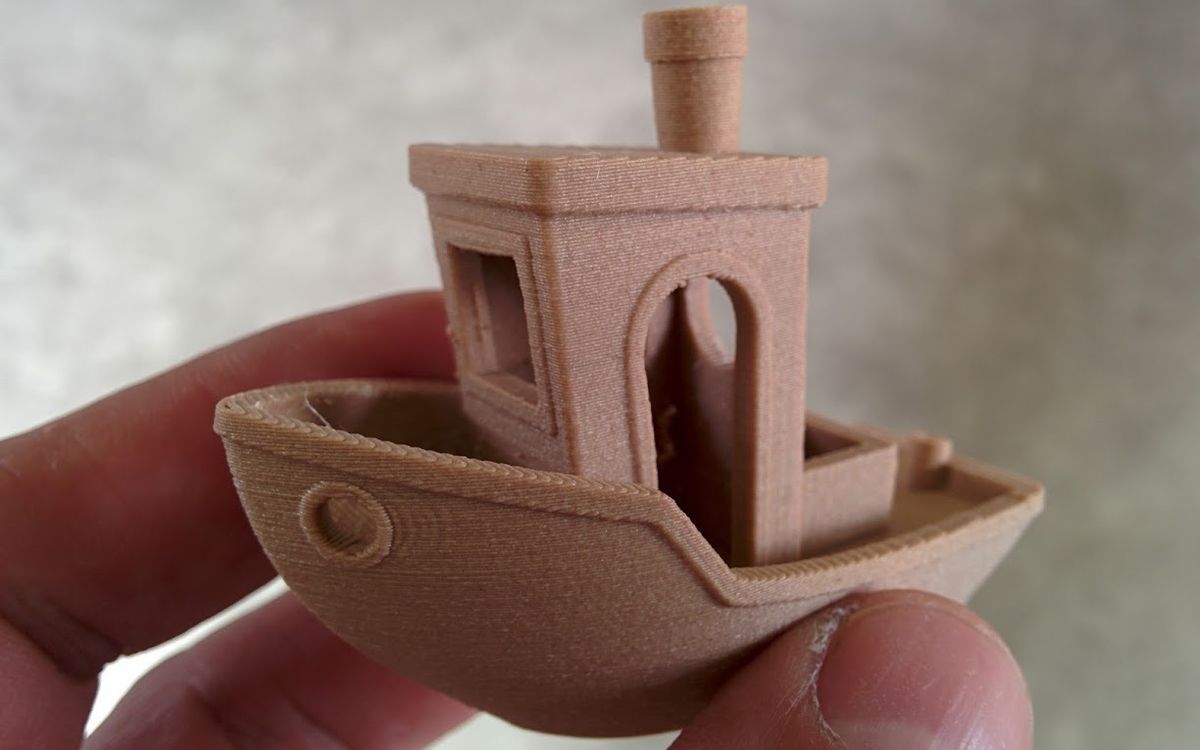
Layer height is the thickness of each slice the printer lays down. It is one of the first numbers we ask for when someone sends us a file, because it changes three things at once: how the surface looks, how long the print takes and, to a lesser extent, how strong the part is.
What layer height actually changes
An FDM printer builds a part by pushing melted plastic through a nozzle, one horizontal layer at a time. With a 0.2 mm layer height, a part 60 mm tall needs 300 layers. At 0.1 mm it needs 600. Every layer is a full pass of walls and infill, so the number of layers is the main thing that drives print time.
Layer height only affects resolution in the vertical (Z) direction. Detail in X and Y is set mostly by the nozzle diameter and the line width. A thinner layer will not make small text on a flat top face sharper, but it will make a sphere, a dome or a gently sloped roof look much smoother.
The staircase effect
Any curved or sloped surface is approximated by steps. The flatter the slope, the wider each step becomes and the more visible the layer lines are. This is why the top of a dome shows obvious rings at 0.3 mm, while a vertical wall at the same setting can look fine. Steep or vertical surfaces hide layer height. Shallow slopes reveal it.
The common settings
Most FDM printers use a 0.4 mm nozzle. With that nozzle, these are the typical choices:
| Layer height | Look | Print time | Good for |
|---|---|---|---|
| 0.1 mm | Fine, lines barely visible | About 2x the 0.2 mm time | Figures, display models, curved surfaces |
| 0.15 mm | Smooth | About 1.3x | A balanced choice for visible parts |
| 0.2 mm | Standard, lines visible up close | Baseline | Most prototypes, brackets, general parts |
| 0.28–0.3 mm | Coarse, clear lines | About 0.7x | Large parts, drafts, hidden functional parts |
The time multipliers are rough. Real numbers depend on the model, travel moves and how fast the printer can actually extrude at each setting, but the rule that halving the layer height roughly doubles the print time holds up well.
The nozzle rule of thumb
A good working range for layer height is about 25 % to 75 % of the nozzle diameter. For a 0.4 mm nozzle that is roughly 0.1 to 0.3 mm.
- Above about 75 %, the nozzle cannot press each line firmly onto the one below. Layers bond poorly and the part can split along layer lines.
- Below about 25 %, the printer is moving very little plastic per layer. Print time climbs fast, and small errors in the Z axis or in extrusion become a larger share of each layer, so the gain in quality flattens out.
If you need thicker layers for speed, use a bigger nozzle: a 0.6 mm nozzle runs 0.3–0.4 mm layers comfortably. If you need finer detail than 0.1 mm gives, resin is usually the better tool.
Layer height and strength
People often assume finer layers make stronger parts. In practice the effect is smaller than you might expect, and it does not always go in that direction.
- Thicker layers mean fewer layer boundaries along Z, and each line has more contact area with the one below. Within the safe range, 0.2–0.3 mm layers are often about as strong as 0.1 mm layers in Z, and sometimes stronger.
- Very thin layers can bond well too, because the hot nozzle reheats the layer beneath, but the extra layers bring more interfaces and more chances for small defects.
- Temperature, cooling, material and wall count matter far more for strength than layer height. A part printed at 0.2 mm with four walls will beat the same part at 0.1 mm with two walls.
For functional parts we usually stay at 0.2 mm and spend the effort on walls, infill and orientation instead. Our infill and walls guide and orientation guide go deeper on that.
Adaptive (variable) layer height
You do not have to pick one number for the whole model. Most slicers can vary the layer height through the print, under names like adaptive layers or variable layer height. The slicer uses thin layers where the surface is shallow and curved, and thick layers where walls are vertical.
A typical case is a figure on a plain base: the base prints at 0.25 mm, the face and shoulders at 0.1 mm. You get most of the visual quality of a fine print for much less time. It works best on models with clear zones of detail. On a model that is curved everywhere, it saves less.
One caution: changing layer height mid-print can leave a faint band where the setting changes, especially on glossy filament. Smoothing the transitions in the slicer helps.
Resin: a different scale
Resin (MSLA) printers cure a whole layer at once with light shone through a screen, so layer height works differently there. Typical resin layers are around 0.05 mm, and we print resin with layer precision down to 0.05 mm. Detail in X and Y is set by the screen's pixel size, not by a nozzle, so resin captures fine features that FDM cannot reach at any layer height.
If you are choosing between 0.1 mm FDM and resin for a miniature or a jewellery model, resin will usually win on detail. For a large or tough part, FDM at 0.2 mm is often the better call. Our FDM vs resin guide covers the trade-offs.
How to choose
A simple way to decide:
- Will anyone look at it closely? If not (jigs, internal brackets, test fits), use 0.2–0.3 mm.
- Does it have shallow curves or fine vertical detail? Use 0.1–0.15 mm, or adaptive layers.
- Is it big? A 25 cm model at 0.1 mm can take days. Consider 0.2 mm plus some sanding, or adaptive layers.
- Is it a functional part? Stay around 0.2 mm and put the effort into walls and orientation.
- Is it tiny and detailed? Choose resin.
Post-processing changes the maths too. If a part will be sanded, primed and painted, 0.2 mm is usually enough, because filler primer hides the lines anyway. See our post-processing guide.
Need it printed?
When you send us a file, tell us the layer height you want (0.1 or 0.2 mm is fine), or tell us what the part is for and we will suggest one. Share a Google Drive link with lab@lightning-studio.org or see the Lab page for details.
Cover photo: -3DBenchy by CT3D.xyz - 3D-printed with ECO Wood filament (16500744844) by 3DBenchy, CC BY 2.0, via Wikimedia Commons (cropped).
Related posts

3D Printing in Education: A Practical Guide for Teachers and Schools
What to print for teaching, STEM projects students can design themselves, classroom safety, budgeting and a simple lesson flow from sketch to printed part.
Tool Changers vs Filament Swappers: Choosing a Multicolor 3D Printer
Creality K3, Sovol M1D and Bambu's upcoming H3C bring tool changing to mid-range prices. How the five multicolor approaches compare on waste, time and cost.
3D Printing Cosplay Props: Splitting, Finishing and Wearability
How to split big props to fit the bed, key and join the pieces, pick PLA, PETG or resin, keep shells light, then fill, paint and pad them for wearing.