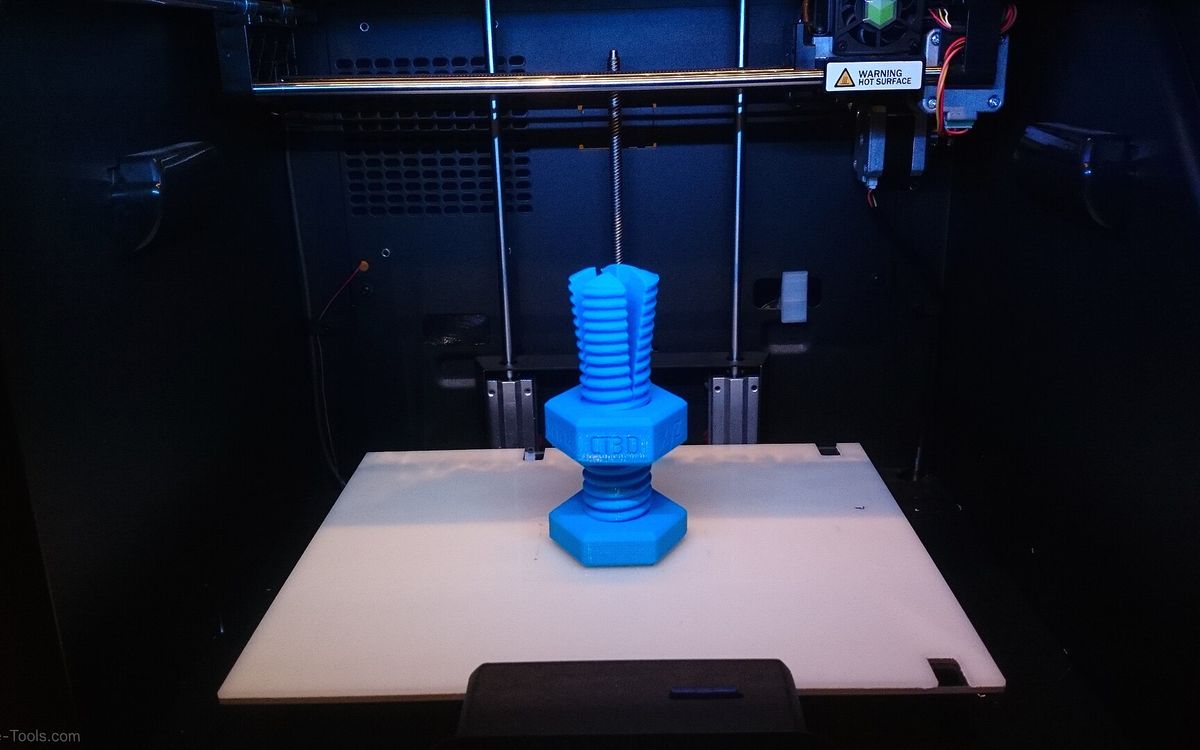
Most printed parts that fail in use do not break in the middle. They break at a screw hole, a thread or a glued seam. Joints are where loads concentrate, and they are where the weak points of FDM (layer lines, limited accuracy on small features) show up first. This is how we approach them.
For general fit clearances, see our tolerances guide. This post is about choosing and designing the joint itself.
Four ways to put a thread in a print
| Method | Good for | Limits |
|---|---|---|
| Printed thread | Large threads, lids, caps, knobs | Poor below about M6 to M8 on FDM, wears with repeated use |
| Tapped or self-tapped hole | Light loads, few assembly cycles | Plastic threads strip if overtightened |
| Heat-set insert | Repeated assembly with metal machine screws | Needs a soldering iron and the correct hole size |
| Captive nut | Strong clamping with cheap hardware | Needs a pocket, sometimes a print pause |
Printed threads
Modelled threads work well when they are big. Bottle caps, jar lids, large knobs and coarse threaded rods print reliably. Small metric threads are a different story: with a 0.4 mm nozzle, the profile of an M3 or M4 thread is close to the width of a single extrusion line, so it comes out vague and weak. As a rough guide, printed FDM threads become practical around M6 to M8 and up. Resin can resolve much finer threads, but resin threads are brittle and do not like being tightened hard.
Tips for printed threads:
- Add clearance. Make the internal thread larger or the external thread smaller so the total clearance on the diameter is roughly 0.2 to 0.4 mm, then test. Many CAD tools offer modelled threads with a tolerance class, and a looser class is a good start.
- Print with the axis vertical. A thread whose axis runs along Z comes out round. Printed lying on its side, the profile becomes stepped and the part is no longer truly circular.
- Use finer layers. A layer height of 0.1 to 0.15 mm gives a noticeably smoother thread than 0.2 mm. See layer height explained.
- Chamfer the first turn. A small 45° lead-in helps the thread start and hides elephant's foot on the bottom edge.
- Prefer coarse, rounded profiles. A coarse pitch or a trapezoidal profile prints better than a fine, sharp V.
Tapping and self-tapping
For small screws, model a plain hole and let the screw or a tap make the thread. For a metric tap, design the hole near the standard tap drill size (2.5 mm for M3, 3.3 mm for M4, 4.2 mm for M5) and drill it to size if the print came out undersized, since printed holes usually shrink a little. Screws made for plastic can go straight into a hole slightly smaller than the screw's outer diameter. Test a few sizes on a coupon.
Give the screw enough material: at least 3 perimeters around the hole, and an engagement depth of about twice the screw diameter or more. This is one place where more walls help far more than more infill, as explained in infill and walls.
Tapped plastic threads are fine for parts assembled once or twice. Removing and refitting a screw many times wears them out.
Heat-set inserts
Brass heat-set inserts are what we recommend for any part that will be opened repeatedly. You press them into a printed hole with a soldering iron: the hot brass softens the plastic, the knurls sink in, and the plastic locks around them as it cools.
- Hole size: follow the insert manufacturer's table. The hole is usually a little smaller than the insert's outer diameter, sometimes with a slight taper.
- Depth: make the hole about 1 mm deeper than the insert so displaced plastic has somewhere to go.
- Walls: leave at least 1.5 to 2 mm of plastic around the insert, printed with 3 to 4 perimeters.
- Iron temperature: roughly the plastic's printing temperature or a little above. Too hot and the insert sinks too fast and goes in crooked.
- Go straight. Use a flat or insert-shaped tip and press slowly and vertically.
Inserts work well in PLA, PETG and ABS. TPU is too soft to hold them, and resin does not melt, so for resin parts use inserts that are glued in or pressed into holes designed for them.
Captive nuts
A hexagonal pocket that holds a standard nut gives very strong clamping for almost no cost. An M3 nut is 5.5 mm across flats and an M4 nut is 7 mm. Add about 0.2 to 0.3 mm to the pocket for FDM.
Two common layouts:
- Pocket in line with the screw. The nut drops into a hex recess on the far side of the part. Simple, and good for moderate loads.
- Side slot. The nut slides in from the side and the screw passes through it. The nut stays trapped even if the screw pulls hard. If the slot is fully enclosed, pause the print at the right layer, drop the nut in and resume.
Joints without fasteners
Dovetails and sliding keys
A dovetail or T-slot lets two parts slide together and lock in one direction. It is handy for splitting a large model or making a replaceable part. Keep the flank angle moderate (around 10 to 15° off square is common for printed dovetails), give each side roughly 0.15 to 0.25 mm of clearance, and print both halves in the same orientation so they shrink the same way. Chamfer the entry end.
Pins and dowels
Pins align parts and carry shear loads. Options:
- Printed pins laid flat on the bed so the layers run along the pin's length. A pin printed standing up snaps easily along a layer line.
- Metal dowel pins pressed or glued into slightly undersized holes. Very strong and accurate.
- A length of 1.75 mm filament in a hole of about 1.8 to 1.9 mm. Cheap and surprisingly effective as a hinge or alignment pin.
Glue joints
Glue works when it has surface area and alignment features to help it.
- CA (super glue) bonds PLA, ABS and resin quickly. Thin CA wicks into tight joints, gel CA fills small gaps.
- Two-part epoxy fills gaps and is stronger on larger joints. It is the safer choice for PETG, which many glues struggle with.
- Acetone can solvent-weld ABS: the surfaces partly dissolve and fuse together. Work in a ventilated area away from flames.
- TPU is hard to bond. Design it to be clamped or captured instead.
Give glued parts pins, keys or a lip so they locate themselves and the glue only has to hold, not align. A flat butt joint on a small area is weak whatever glue you use. For cleaning up glued seams, see our post-processing guide.
Orientation decides strength
FDM parts are weakest between layers. Pulled across the layer lines, a part is commonly 20 to 50 % weaker than when pulled along them, sometimes worse. Plan joints around that:
- A screw boss printed vertically, with the screw pulling along Z, can peel layers apart. If the load is high, turn the part so the boss lies on its side, or use a through bolt and nut so the clamping force presses layers together rather than pulling them apart.
- Clips, tabs and pins should flex along the layers, not across them.
- Add fillets where a boss meets a wall. Sharp inside corners concentrate stress and start cracks.
Our supports and orientation guide explains how to balance orientation for strength against supports and surface quality.
Test before the full print
Print a small coupon with the actual hole, insert pocket or thread before committing to a large part. It takes minutes and saves hours. Keep it, and note the sizes that worked for the next design.
Need it printed?
If you are designing a functional part and are not sure which fastener to use, send the model or a sketch to lab@lightning-studio.org. We can print test coupons and the final part in PLA, PETG, ABS or TPU, and model it from a sketch if needed. See the Lab page.
Cover photo: Impossible 3D-printed bolt and nut (15809864503) by Creative Tools from Halmstad, Sweden, CC BY 2.0, via Wikimedia Commons (cropped).
Related posts

3D Printing in Education: A Practical Guide for Teachers and Schools
What to print for teaching, STEM projects students can design themselves, classroom safety, budgeting and a simple lesson flow from sketch to printed part.
Tool Changers vs Filament Swappers: Choosing a Multicolor 3D Printer
Creality K3, Sovol M1D and Bambu's upcoming H3C bring tool changing to mid-range prices. How the five multicolor approaches compare on waste, time and cost.
3D Printing Cosplay Props: Splitting, Finishing and Wearability
How to split big props to fit the bed, key and join the pieces, pick PLA, PETG or resin, keep shells light, then fill, paint and pad them for wearing.